EJ asked me about credit card swipers and I think we both knew about the same amount. That there were two out there that worked easily on smartphones. PayPal Reader and The Square. (Click either for signup and more info.)
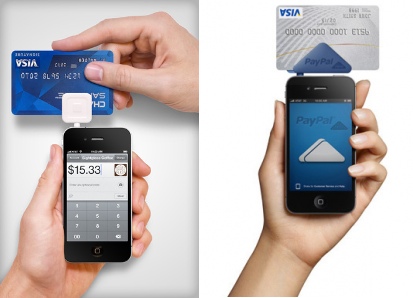
So it’s 2013 and Rubber Duck thinks it is time for all the galleries and small shops to get one of these if they are still using the old paper ka-chunk machine for credit card transactions. Even the old phone swipe machines are old technology and slow. Are you going to lose sales if you don’t upgrade? Maybe. Crowded shop on Saturday and you want to spend time with the customers and they don’t want to wait in line while you either ka-chunk or use the telephone to call in a card.
Rubber Duck recommendations. What you need:
1) Smartphone. Android or iPhone both can use them. You probably already have one or you already know if you are an iPhone person or an Android person. Joey likes Androids, I like iPhones, personal choice. (Do make sure your phone version is new enough. It likely is.) There is a caveat to the iPhone. It is very easy to turn an iPad into a cash register. If you have wireless in your shop that iPad is a cash register and a credit card swiper. Clear all the old tech away and you may not need the smartphone.
2) PayPal Reader or The Square. Kind of a toss up. Both are dead simple to use once you have given them all your documentation. Rates are 2.75% or 2.7%. I hope everyone picks both then complains about the percent. Competition will drive it to a more reasonable 1.85% of the old ka-chunk. But that extra one percent is worth the convenience.
One caveat: If you already have a PayPal commercial account as a collection source I would look at their set-up first. If you are really pinching pennies The Square rebates the ten bucks you paid for it. And the deals you can get on smartphones are pretty decent lately. You don’t need the newest model iPhone 5. You can get the iPhone 4S for 99 cents when you sign the two year deal. Same kind of deals on Androids since the wicked awesome Samsung Galaxy S4 that tracks your eyeballs is coming out the S3 is/will be cheap.
Will I buy lobsters from Joey with a swipe next to the scale? Sometimes cash is the handiest and 2.7% would pay for a few rubber boots. But transactions in a gallery where the tourista only has a card and not much time, it’s a good fit. It only takes one extra impulse purchase per month to easily cover the cost.
Imagine you have a card table in front of the store with mugs. Someone walking by likes one. Swipe right there, they sign the phone with their finger, and done.


 Good Morning Gloucester
Paul – I have been a square user for a couple of years now..it also works great for summer rentals that lots of people have here, exercise classes and even people who have yard & garage sales !!! It is a worthwhile tool of the trade !
LikeLike
Great tips. I never thought that even at a garage sale it would come in handy. When the woman pulls the “I only have a twenty” and your set of candlesticks are thirty you don’t have to drop the price, just swipe.
So on the Square, there aren’t any hidden fees so you could get one and try it out with just a few things? Since you get the price of the square rebated back it seems like a no brainer that everyone who is even thinking of selling something should have one.
LikeLike
Very informative. We have been using Square for a few years and love it – they deposit quickly. We also have the PayPal one as we have a PayPal account and PayPal debit cards but PayPal holds back on releasing payment longer so we have not been using that one. Also with Square you can use it as a register so with an Ipad or Iphone you can totally replace your cash register entirely as you can also record cash or check payments with it and send those who pay you with cash or check a text or email receipt as well (obviously it does not take a percentage of cash or check sales just records them for you and allows you to send a email or text receipt) you can also load your inventory into the Square register and so when someone buys something you just tap on that item, the PayPal one doesn’t let you do that. We have not paid any money out of pocket for either of our readers, they were both sent free of charge and when our first Square reader quit working they sent us another one very quickly. I recommend either/both to anyone who has a need to take credit car payments from anyone. They do not charge you a monthly fee the only charge are the percentages that Paul mentioned when you do take a payment. This is one of the best inventions for small businesses in the last few years. I highly recommend them with Square coming out slightly ahead of PayPal though we do use PayPal for online ecommerce.
LikeLike
Great info comparing the two. So there really is no downside to getting both and trying them out then if one of them ends up in the drawer gathering dust there is no monthly payment ticking away. I guess the only downside is using up the brain cells to get them to work but they seem pretty simple. Having an inventory list on The Square might help give the customer the warm and fuzzy feeling you know what you are doing if you are tapping, “oh that’s two 8x10s at x dollars per and a 36 inch wide format for z dollars”.
LikeLike
There is no reason not to have both – we have had issues with connecting to Square only a couple times but it was nice to have the PayPal backup. They are very very simple and user friendly they pretty much walk you thru the process, I do recommend that if you have one that you buy a stylus so people don’t have to sign their name with their finger – though we are always misplacing ours.
LikeLike
Great post. A slight correction. Even though I own an android phone I’d recommend an iPhone for all but the geekiest tech people out there. Android ultimately you can customize more but it also leaves more room to change settings to something you don’t want and a non tetchy person who is scared to dig through menus can get frustrated by the amount of customization an android phone offers.
I’d buy my Samsung galaxy s3 again but if my mom was shopping for a phone I’d suggest an iPhone.
LikeLike
I’ve heard a lot of horror stories about paypal – the other option sounds better. There’s also options like LevelUp, which is in use in a good amount of places in Boston/Greater Boston. https://www.thelevelup.com/mobile
LikeLike
Right now Level Up is only accepting businesses in the food service industry – they also want you to run a deal – it will be interesting to see where they take it to.
LikeLike