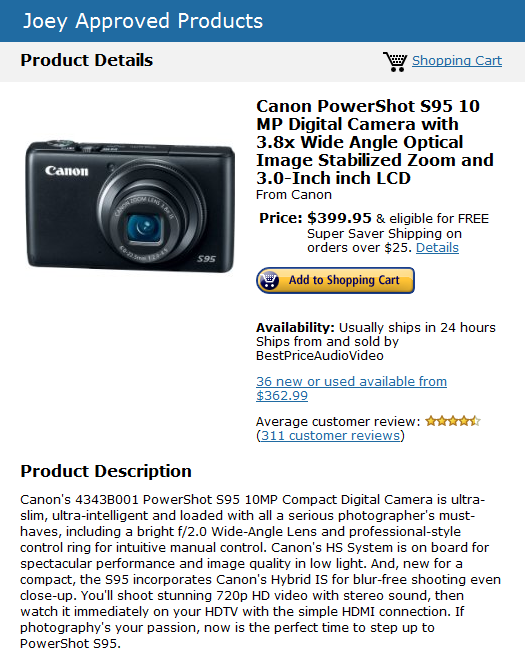
Update: The Gear You Should Buy- Pocket Camera The Canon Powershot s95:Gizmodo Agrees Calling It The Best Pocket Camera

I posted this about a month ago but am editing it because a gadget blog I visit daily just named it best Pocket Camera.

Here is their article that came out today September 1, 2011

http://gizmodo.com/5720794/battlemodo-the-best-point+and+shoot-cameras

The only thing is they say it is around $400 but I see the Powershot s95 on Amazon for $369 here

People ask me all the time what camera I would buy.  As a gadget information freak I feel like I’m pretty qualified to give advice in this arena so instead of answering this question over and over again in private emails I’m going to start a series of my personally approved items that I 100% endorse.  I’ll also give you the reasoning behind why I endorse the products.

The first product up is for a pocket camera.  many of you have read my thoughts on cameras and how important I feel it is to own a camera that you can comfortably carry with you without having to lug a cumbersome bag.

Before anyone should own a DSLR in my opinion, they should own a good pocket camera.

The canon powershot s95 is not like 99 percent of compact cameras in one hugely important aspect- It contains a sensor that is 88% larger than most compact camera sensors.  while most people ask about megapixels, what they don’t realize is that the size of a camera sensor is vastly more important to picture quality than the amount of megapixels packed onto a small sensor.

Photography is all about collecting light and recording it.  A larger sensor allows you to collect more light more efficiently so you get far superior results.

Here is an article in the new York Times from technology editor David Pogue-

A Love Letter to a Camera

Dear Canon S95,

I don’t often write love letters to gadgets. But you, you’re something special.

Truth is, I’ve been searching for someone like you for years.

The Canon S95 has a sensor with 88 percent more area than most pocket cameras’ sensors.The Canon S95 has a sensor with 88 percent more area than most pocket cameras’ sensors.

FDDP
The Times’s technology columnist, David Pogue, keeps you on top of the industry in his free, weekly e-mail newsletter.

See, I love the huge light sensor that’s inside an SLR. It can take sharp low-light shots without the flash. It can blur the background the way professionals do.

I just don’t like how an SLR is big and heavy and obtrusive.

What I’ve always wanted is a little camera with a big sensor. Is that so hard?

Apparently, yes. The problem is covering a rectangular sensor chip with a circle of light from the lens. Bigger sensor? You need a bigger camera. Those are the simple bylaws of physics.

But you, oh, cute little Canon PowerShot S95! I love that you’re a pocket camera, only 3.9 by 2.3 by 1.2 inches. I love your big, bright, three-inch screen, your built-in flash, your H.D.M.I. output for hi-def TV sets. I love that you turn on directly into Playback mode, without having to extend the lens.

I love the unique control ring around the dial, which I can quickly program to adjust whatever feature I want: focus, zoom, exposure, light sensitivity (ISO), aperture, even degree of color saturation (all the way to black-and-white).

I’ve had fun with your special modes, like the tilt-shift-lens simulator and fake fisheye.

I love the wink-driven self-timer. Yes, I set up the camera, walk into the scene, and then wink—the picture is taken two seconds later. Beats hunting around for a remote control. (Or I can ask you to wait two seconds after a new person—that would be me, joining the group—enters the frame.)

But above all, I love your enormous sensor. It’s 0.59 inches diagonally—88 percent more area than most pocket cameras’ sensors. And I love that you have an f/2.0 lens, a rarity among pocket cameras, meaning that you let in a lot more light.

And all of this means that you, little S95, can take amazing, sharp pictures in low light without the flash. Your designers have shrewdly dropped the ludicrous quest for more megapixels—you have 10 megapixels, just right—in favor of something that really matters, like better photos.

click here to read the entire article at The New York Times Website

So if you want to buy it, you can get a great deal on the Canon Powershot on Amazon here-
image

My best technically difficult shot of 2010 was taken with this camera-

Here is a video demonstrating how great it is in low light (a true test of a camera’s sensor)

GMG Tech Talk- Google Plus, Google Circles

How many of you are actually using these services?

image

When they first appeared around what seems like a couple of weeks ago lots of people were signing up and tech media were predicting that it was going to turn Facebook on it’s ear. ahem (Paul Morrison).

The numbers of people were signing up for the services were enormous as there are already a ton of people who use and trust Google products to begin with.   So the growth was probably from people saying sure, what the hell, I’ll give it a try and with the sheer number of Google users to begin with those numbers of new accounts when reported in the media are staggering.

Well Google products have a long history of success and I use many of them daily. Gmail, Google Calendar, Documents, Google Music and Google Listen among a few I use most every day.  There have been a few misses with products that may have been a little ahead of it’s time or too smart to catch on universally.  Among one that comes to mind was the collaborative tool Google Wave which promised real time online collaborations.  I used it once or twice and it was interesting but not enough folks caught on.  Kenny and I edit our podcast shownotes in Google docs sometimes simultaneously and Google Docs seems like it took a lot of things from Google wave and integrated them.

As tech savvy as I consider myself I still can’t get the hang of circles.  It may be just a little too slick and I just don’t have the energy to figure it all out right now.  So my intuition tells me that if I can’t figure it out in a snap that most grandmothers will say fuck it and not bother.  This is a huge difference between Facebook and Google Circles.  Facebook seems just super easy peasy lemon squeazy whereas Google Circles seems like people really need to sort a whole bunch of stuff out to make it manageable.

Google +?  I’ve clicked on that +1 button on a bunch of different sites including this one when there are things that I find interesting and I figure it will share that somewhere but I’ve yet to figure out where that +1 button is visible or who gets to see the post or page that I find interesting enough to click the +1 button for.  Again, I consider myself pretty much a 9.5 on the scale from 1-10 on the tech geek scale so for me not to understand it gives me a strong sense that a good majority of people don’t understand it either.

Maybe once my season slows down and once the winter doldrums set in I’ll have time to get more into it but I’m just not sure the masses will and isn’t that what Google wants to capture with it’s products-  the masses?

image


GMG Tech Talk- Don’t Fall For The Megapixel Hype

It seems camera manufacturers are in a race to offer cameras with more and more megapixels.

Here is an excellent definition of megapixels and when they count and when they don’t-

Trying to Define Megapixels?

What is more important than megapixels is sensor size.  the sensor is what collects the light at the other end of your lens and the larger the sensor size the more light can be collected and presumably the better your photos will be.

Here is a sensor size chart-

from wikipedia


Most point and shoot cameras today have sensors that are 1/2.3  APS-C sized sensors like the ones found on your average DSLR are much larger and image quality in low light situations are noticeably better. 

So when shopping for a camera you can go with a larger DSLR for the very best images or a smaller one with an above average sized sensor that will still fit in your pocket like the one I recommend, the Canon Powershot s95.  I think at $369 it is the very best combination of size/price/quality.

Do Not get lured in by megapixels when shopping for a camera.  the Mrs’ Nikon D40 only has 6 megapixels (very few compared to todays 12-18 megapixel cameras) but gets photos like these-

click picture for slide show

If you ever want a camera recommendation let me know and send me an email.  I’ll ask a few questions at to what you will be using it for and give you a recommendation.

goodmorninggloucester@yahoo.com

Recently on Mashable, highly respected tech blogger Charlie white writes about two cameras in which he pits head to head to decide which is best for a blogger.  I conclude that neither are great options.  Read the article for yourself and look for my comments at the end-

Nikon D5100 vs. Olympus E-P3: Which Camera Is Best For Bloggers? [REVIEW]

I say neither.

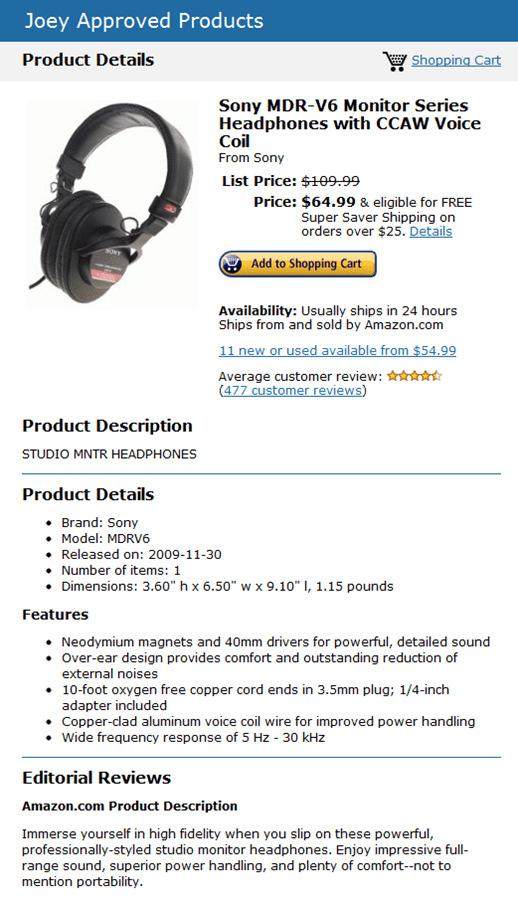
Gear Joey Loves- The Sony MDR-V6 Headphones

I can understand why portable earbuds are popular, because you can stick ‘em in your pocket and carry them every where you go.  I use them for travel but it doesn’t take too long for them to really irritate my ears.  They are uncomfortable, sound tinny as hell and the wires seem like they always become a tangled mess.

Do you remember back in the early eighties when they made real headphones?  The ones with the nice soft cushy ear pieces that slipped over your ear and delivered that high fidelity music to your ears?  Well there are a classic set of headphones that Sony still makes and they are currently on sale.  Normally they go for around $109 but right now they are on sale on amazon for $64.99 with free shipping.

When I tell you that for $64.99 you will rediscover the way music was supposed to be listened to the price seems negligible.

You can order them here

Here are some of the reviews from audiophiles-

111 of 118 people found the following review helpful.
5My favorite headphones

By M. Chabot
The Sony MDR-V6s were the first really good headphones I owned. After about 15 years of use, the foam padding was a bit run down. After doing the exhaustive search for the best headphones, I bought a pair of Sennheiser HD580s (I also own Etymotic ER-4Ps). Comparing the HD580 to my MDR-V6s, I would say that the MDR-V6s are better for two reasons. 1. The MDR-V6s are more comfortable to wear for long periods of time, and 2. The MDR-V6s have a telephone-like cord, which is easier to deal with than the straight HD580 cord. The sound quality was very good on both headphones, and about equal. I ended up buying new foam pads for my 15-year-old MDR-V6s, which made them feel like brand new headphones. I also bought a second pair of MDR-V6s, and shelved the HD580s for now.

Do not buy the MDR-600s by mistake. I have never used them, but I have read numerous reviews that state that the MDR-600s are inferior to the MDR-V6s. You can still buy the MDR-V6s, but they are harder to find. I bought mine at millionbuy because Amazon did not have them in stock. For some reason, the MDR-V6 product name at Amazon magically changed to MDR-600, even though it is an entirely different product. I am not sure why this happened.

121 of 130 people found the following review helpful.
5A Classic
By Bruce Caines
I can’t recall how long I’ve owned my MDR-V6 phones, but it’s easily been ten years. The sound is excellent, virtually uncolored, and unlike other top of the line headphones like Sennheiser’s (which are VERY nice and well over $150.00) these sound as good used with a portable CD player as with a well powered home system.

It was time to replace them since the cord is finally shorting too much to ignore any longer and my ears are always covered with black stuff and foam from the disintergrating earcups. I asked around and a colleague who is the audio technician on a popular TV show told me without hesitation, these are the ones to buy. It’s what he uses on the set and at home. I’m glad Sony still makes ’em. Maybe I should buy another pair for ten years down the road…

image

QR Code To Subscribe To Good Morning Gloucester

If you have a smartphone you can scan the above image and it will bring you to the subscribe page.  (Free of course)

Try it, I promise a monster won’t jump out of the screen and bite you, lol

Magic!

Cape Ann Twitter Folk and Joey’s List

Here is a list of local twitter folk. (another attempt to pull our community kicking and screaming into the current century)

I’m determined damnit!

If you have tried twitter but just don’t get it, it may be because you may have set up an account and don’t follow anyone and no one was following you, in which case then twitter is basically useless.  That would be the equivalent of screaming in the forest and no one hearing you.

Start out by following the tweets of the people listed below. You enter them into your follow list and  then you can get an idea of what is going on around you.  Engage the people on this list if you have questions or want to give them props for a service or meal or activity they provided.  If you don’t already have a twitter account go here- http://twitter.com/ and get one for free.  Then add in the users you see below.  You will have a great idea of what is going on around you and when there is some type of emergency around town 9 times out of 10 you will get the answer on twitter before you will anywhere else.  That is if you are following a bunch of local folks.

My suggestion is to follow all of these people even though they might not seem to be in your particular line of work or seem to have the same interests as you.  To have only 3 or 4 people in your twitter universe is pretty pointless.  you can always unfollow people if their tweets are boring to you or obnoxious.

image

@Joey_C  @DscvrGlstr   @WickedLocal  @Gloucester_MA  @CapeAnnsFinest @blue_shutters  @7SeasWhaleWatch   @EssexCruises  @MayorKirk @Woodmans_Essex  @AlchemyBistro  @captbillandsons @JoeB_Hemoglobin
@CapeAnnBrewing  @CapeAnnArtHaven  @minglewoodtav @TriAndDuit @melissaabbott @NSMusicTheatre @audreysflowers  @USCGNewEngland @NorthShoreDish  @WhaleCenter  @gpgloucester  @TheActiveDad @Paulinesgifts  @TSapienza  @schmap  @BostonArts  @masscultural @BeanLeafCafe  @freshnewengland  @DawnTheresa@HA TheatreWorks
@GDTnews  @MLayneCreative  @CovetedYarn  @DogBarGlo
@CapeAnnLanes  @MassWhales  @CapeAnnOnline @glazedceramics @FarmBarGrille  @RockportMusic  @SeaportGrille  @CapePondIce @CaptJoeLobster @EssexHeritage  @YankeeCapts @LaProv @againandagainbags  @BostonLogan @latfortythree  @CapeAnnCinema @HistoricNE @SEASIDECYCLE  @CapeAnnSymphony  @EssexMusicFest @VisitMA  @SchAdventure  @bostoncalendar  @PlacesMA @SamOnTravel
@HuffPostTravel @Braincandyproj TheCapeAnn EJCIII

BWilliamsStudio KgentileRoberts charlesdgb

rlsartsECGreenbeltStevenFletch @JMcElhenny @NorthShoreDish @@kidns @SamanthaRSPR @LocalGingerNS @heather_atwood @lilylinqs @mkpfilos89 ArtsGloucester @TheRovingHome @5thjoy @baitandtackle @2palaver @glosta @laurielufkin @MoneyMindfulnes @AliciaPensarosa @mbcf @vintagerockport @andreasoldier @abbielundberg @rlsarts @ryanpjm @Toodeloos @debclarkeglosta @kathleen01930 @capeannpainter

If anyone has been left out it is not by design.  This is basically a copy and paste job from the twitter list of Linn. let me know if you want to be added and I missed you and I’ll add you right in ASAP.  You can always unfollow people so my suggestion to you is to follow all of these people and if the tweets that they put out are of absolutely no interest to you simply unfollow them with the click of a button.

You can also very easily look at my list of local Cape Ann Twitter Folk here and simply go down the list and click on their names and then click follow- Joey’s Local Twitter List If you don’t see yourself on my local list tweet me and I’ll add you in.

GMG Tech Talk- Last Night’s Social Media Presentation At The Cape Ann

Henry Allen has taken the space that used to house The Blackburn Tavern and turned it into a cultural activity center in which he has so much stuff going on it would make your head spin.  Henry’s deal is a whole ‘nother post- or ten posts.

Anyway in his space the Gloucester Destination Marketing organization led by Linn Parisi invited Art Haven director and good egg Dawn Gadow and I to come and give a presentation on Social media for tourism related business.

There was a good amount of people that showed up of all levels of sophistication as far as the web goes and how to use it but most of the folks that attended would probably admit that they are in the dark about how to use such things as twitter and Facebook to promote their business or organization.  After all that was why most showed up.

The key observation from the meeting to me was that the biggest obstacle for people getting started is some type of fear that they are going to somehow screw up and it is somehow too complicated.

Now I don’t know that I’m any kind of “Guru” on this stuff as Linn tabbed me in the promotional material but if anyone considers me somewhat competent at blogging or tweeting they should know that I only started three years ago.  Granted I am intensely committed to GMG and learning the ways to make it better and push the boundaries further but I didn’t know about any of this stuff three years ago.

You want to know how I got started?  I didn’t take a class or go to college in it.  I’m a dumb ass lobster dealer for Christ’s sake.  I just signed up for a free blog account on WordPress and filled in the blanks where they asked questions like username and password.  If there was something I got stuck on I didn’t call a help desk, I clicked on the support button that allows you to type in a question or keyword and they give you the answers.  Trial and error and tweaking and reading feedback and looking at statistics to see what worked and what didn’t.  It didn’t cost a dime initially.

So I started out the presentation talking about Trip Advisor and a story about how when we went to St Lucia we used Trip Advisor to determine what activities we were going to do on our vacation.  The number one thing listed in the area of St Lucia where we were staying was this Segway tour.  The Segway tour was lots of fun and at the end of it the tour guides reminded us a couple times very subtly that if we enjoyed ourselves to please leave a good review on Trip Advisor.  It was brilliant.  It cost the tour operators nothing, and it boosted their tour to the number one spot on an international widely used travel site-Trip Advisor.  You can’t pay for that type of positive exposure in the tourism industry.

The point was that all kinds of people are using social media to get their message out there and if you aren’t then your competition has a huge leg up on you.

I spoke about twitter but really Facebook is the monster right now.  It is taking over the way people communicate world wide.  The numbers are astounding.  Ideally if you own a business, you have a Facebook page where you upload photos or post specials or interesting stories about what is going on in your industry.  Then you link your Facebook page to your twitter account so every time you post to Facebook, the title and link back to your Facebook page gets listed on your twitter timeline.  Also when you post you should include keywords or hashtags so that search engines will pick up those areas of interest and like minded people or potential customers can find your information.

You don’t want to be perceived as spammy and just continually beat people over the head with products you are trying to sell.  Being somewhat funny helps and when you create a Facebook update or Tweet, try to think of the end user and make it worth their while to read what you are writing.  People love visuals.  Pictures can be taken with any new smartphone and uploaded directly to twitter or Facebook in mere seconds.

Here are examples I would use in each industry off the top of my head

Whale Watch-

every day the naturalist or captain takes a 20 second to 2 minute clip of whales breaching and uploads it to Facebook.  Your customers, people that love whales would have a reason to come back to your page every single day.  you will be present in their consciousness and when they are sitting around with their thumbs up their ass trying to figure out what to do in August because they’ve already been to the beach 30 times it might just click with them, hey, lets go on a whale watch.  I saw this cool video and every single day you get to see these real like monsters of the ocean just yards away from you.  Boom!  Sales!

Video gets uploaded to Facebook and linked to twitter account

Restaurants-

Daily specials, pictures of any new dishes and new seasonal menus posted to to Facebook with a direct automatic link to Twitter. See The Farm Bar and Grille, or Minglewood Tavern for very successful Social media campaigns.  The farm Bar and Grille has over 2200 Facebook followers.  That means every day when they talk about 35 cent wing night on Thursdays every one of those 2200 followers gets reminded.  Not to mention their twitter followers.  Now even if they only converted 10% of those people into customers isn’t that an incredible bang???

Deep Sea Fishing-

Every Trip a mate or Captain takes a photo of the largest fish caught that day with the person that caught it holding it up and post it to their Facebook page.  Believe me when I tell you that everyone loves to see their picture taken with a huge fish.  You hand a sheet of paper to each passenger as they leave the ship with your Facebook page web address and tell them to look for pictures from that day.  I am fucking telling you, you will have an incredible amount of people checking out your page from the customers and family members that they want to brag to all their friends about the huge fish they caught and forward the pictures to them.  Link the Facebook page to the twitter account for automatic updating.  If any unusual fish are caught highlight those.  If you have some regular funny customers do little video clips with them that are like testimonials as to what keeps bringing them back to your deep sea fishing operation.  also fishing reports as to what kinds of fish is being caught.

Artisans-

Any new works, several updates as to the work in various stages of completion.  Any art shows that the artist will be showing at or local events.  Links to twitter account automatically.

It was great to get to talk to these folks. I hope we made an impact as if you’ve been reading these pages you know I’m committed to getting people involved in promoting all the cool stuff going on in our city.  I told these fine folks that once they get themselves set up with accounts that I would highlight them here on these pages as an incentive to get off their ass and make that first step. So expect to see more promoting of local twitteratti soon.

You gotta start somewhere.  Take the leap into the Cape Ann Social media pond, the water’s just fine.

I know most people don’t give a crap about yarn but please listen to Robert talk about his success at local yarn shop Coveted Yarn which has a global reach and how social media has helped him gain instant sales for no money at all-

Please watch the video and if nothing else from the five minute mark when he talks about how big Facebook is for his business and how it has led to his recent expansion.

iPad, iPad2 Should You Take The Leap? My View

Right now there are Apple freaks lined up for hours to get their mitts on the new iPad, the iPad 2.

As someone that has owned an original iPad for the past three months I’d like to give a little advice to those of you who are considering the device.

First off I absolutely love mine, the first Generation which came out about a year ago. It is the coolest electronic device I’ve ever owned. At this point I should also state that I am not a blind Apple follower. I was hugely unimpressed with the last gen MacBook pro and feel that the last generation incredibly underperformed my Windows laptop which cost about one third the price. So this review is coming from a guy who is completely impartial and judge these things based on how easy they are to use and how quickly they get them done.

There are several types of computer users and I will spell out what device I would buy based on several different scenarios.

In my opinion 70% of computer users in the US could easily use an iPad and never miss a single feature of a desktop or laptop computer. This is based on my theory that 70% of computer users don’t do much more than check email, Facebook, YouTube and occasionally upload a picture or two and that is the extent of their computer use. I would argue that the form and function of the iPad is awesome for those tasks and any more computer is overkill and a waste.

If you fall into that category and are debating wether you should buy a laptop, I would suggest you buy yourself an iPad instead. Now you have a couple of different choices. You can buy a refurbished first generation iPad for $349. Or you could buy the newer generation one for $499. I haven’t played around with the new one yet but I can tell you that the one I’ve had is awesome. I reach for it before I reach for the laptop at the house. So if money is a bit tight I wouldn’t hesitate recommending you get yourself a $349 refurbished unit from Apple. You will love it, trust me.

If you are rolling in dough I wouldn’t fault you buying the iPad2. It is 33% thinner and 15% lighter and has a faster processor. I guess it can’t hurt to have a faster processor but I’ve never felt that the first gen was sluggish. $349 for a like new refurbished iPad to me is a sweet deal though. For the amount of time you will use it that $349 sounds just sooooo doable.

Despite what the Apple folks would like you to believe however, for the other 30% of computer users who use their computers to create lots of content. To edit videos, to edit photos, to really write long blog posts or novels or articles or word documents or spreadsheets, you want a laptop.

While the iPad is the best device out there to consume content on the go, and it is capable of creating content, it just isn’t nearly as efficient for creating large quantities of content for the power user or above average content creator.

So if you don’t already own a capable laptop or desktop computer but create a good amount of content I would say those are easily a better option than either the iPad or iPad 2.

Now for those of you with the means and you already have a laptop or desktop but want to splurge, by all means go out and get yourself an iPad for travel or commuter rail or browsing the internet on the couch.

With the amount of content I create, a small laptop is probably a better option for me than my iPad as I create one to two videos a day and upload anywhere from 2-30 photos a day. I can’t justify owning both so I’d like to sell my 3 month old iPad. I figure since it’s only 3 months old and in perfect condition that it should bring in $300 if anyone wants to buy it and I’d go get me a small laptop and someone would get a great deal. Last week I offered my iPad for sale for $375 to a few friends. I never expected apple to offer refurbished units for $349 quite honestly. $349 for a refurbished one is a great deal as well, but mine for 300 with a $30 sweet case included is a much better deal.

I hope I shed a little light on the subject for those of you considering taking the leap. Feel free to ask any questions.

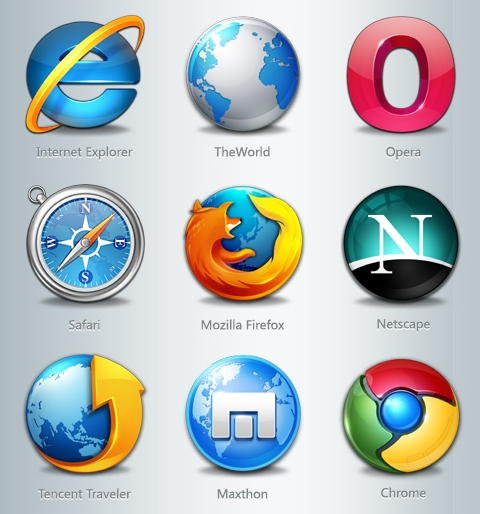
Browser Wars- Who Ya Got? Poll

image

After basically swearing off Internet Explorer about three or four years ago I’ve been a pretty happy Firefox user but my interest in Google’s chrome has been piquing.

When we got stuck in Florida on our trip back from St Lucia last week we were lucky enough to get some time to hang out with my parents in Naples.  In addition to affording me time with my parents I got to log onto a computer for the first time in 9 days- my mom’s.  My mother will click any picture sent in an email by one of her friends that has a cute dancing bunny or heart on it (without any regard for the spyware or viruses she is downloading to her computer with that click).  She also has a fondness for toolbars it seems.

On a 17 inch laptop she may have had 3 inches of visible screen real estate after you account for the 8 or so toolbars that she has running in her Internet Explorer browser.  Let’s see, I think there was Yahoo toolbar, AOL toolbar, Google toolbar, something called Smilebox,and two or three coupon alert toolbars that I could remember.

Clearly I needed to download a new browser for her.  All this crap she had downloaded brought her laptop to a crawl.  I could almost hear it crying out for help, saying “Please, help me tell me you’re not going to add more crap to my already splitting at the seams workload”

So I downloaded Safari for her.  I’m not really sure why I picked Safari but it probably had to do with the fact that I was using Safari for the past 8 days on my iPad and it’s a pretty clean interface.  So once I got Safari on her laptop and imported a bunch of her favorite bookmarks to her toolbar and gave her a quick lesson on how to add bookmarks she was off and running.  The new browser started up about twenty times faster, there was about 80% more screen real estate due to the lack of those layers of toolbars stacked from the top of her screen to three quarters of the way down.   It will work well for her.

So I got home and the Mrs’ laptop has Internet Explorer as the default browser as well.  The Mrs to her credit is pretty good about detecting what she should and shouldn’t click on.  (Anyone have any general rules we could pass on to folks as to what you use for criteria for what you will and won’t click on?)  But I’m just not a fan of Internet Explorer.  It seems so sluggish and automatically hyperlinks things I don’t want hyperlinked, the security settings slow me way down and it doesn’t offer me single right click access to image url addresses and other geeky stuff that 97% of you probably needn’t worry yourselves about but to a person that really uses these features can drive nuts.

So I decided to check out Chrome on her laptop.  It was a quick download and I really like the minimalist and clean layout.  I haven’t used it enough to really know if it could replace Firefox on my desktop at work but it really simplifies many steps such as bookmarking and I love how doesn’t use up a lot of your screen with toolbars.  It also seems super speedy.

So this leads me to ask my viewership- Which web browser do you use and why?  Please leave a comment and let me know where you place your browser love?

I Swear If I Get Another Linked In Invitation Reminder I’m Gonna Jump

OH MY GOD

image

You know how there are those little annoyances in your life that after a while get under your skin?   One of mine is this social media company Linked In.

Listen, I like Social Media.  A blogger generally gets how useful a tool it can be.  Even though I don’t use Facebook I recognize how powerful and fantastic a way it is to communicate.  It is taking over the world, believe me.  The only reason I’m not on Facebook is because of the dedication to GMG. If I ever got started with FB the time suck would take away from this great thing we’ve created and we can’t have that now can we?

I’m a fan of Twitter and how effective a communication tool it is.  140 characters easy-peasy directed to exactly who you would like and delivered to their mobile device, desktop or  email.  Fantastic.

I just don’t feel the need to be on another Social network and especially one that seems so goddamn desperate that they can’t take no for an answer.  For any of you who are choosing this Linked In social media thing I’m guessing you are doing so because it is what they are selling you as the business type of social media much like they try to sell business people on the inferior Blackberry technology over Android or even better iPhones.

Listen to me- when you sign up for this Linked In service and send out messages to everyone in your email contact list, they are just hammering your contacts with invitation reminder after invitation reminder even though you’ve already ignored the last one because you don’t feel like having to tend to yet another social media service.  Trust me on this- no one gives a fuck about Linked In- all the cool kids are on Facebook.

I understand why they send these invitation reminders.  It is because for you to accept the invitation to join the person on Linked In, you need to join Linked In.  They would like to build up a network much like Facebook and possibly sell it for a bazillion dollars but friends believe me, it’s an also ran much like Blackberry will be and Nextel.  Just because they TELL you it’s for business people doesn’t make it a better technology.

Please for the love of god don’t send me any more Linked In invitations because much like the past 7,000,000,000 Linked In invitation reminders they will be ignored.

Please don’t take this that I still don’t love you and want to hear from you.  I’m just trying to enlighten you on what the hell is going on with this brutally obnoxious social media company.

I’d like to be Linked Out

How To Publish Your Book (or Not) From Kat Valentine

With the explosion in eBook readers such as the Kindle, Nook and iPad I‘ve been intrigued on how things in the publishing world are changing.  Katy Valentine has a good number of books in print and also available electronically.  Not only that, Kat has helped local authors self publish their own books like Melissa Abbott.  So to say that Kat can speak to the subject would be an understatement. 

So Kat is doing a series on her blog-Parlez-Moi Press about the different ways that people go about bringing their books to the marketplace and she is Guest posting here on GMG.

So here is the first in her series-

How To Publish Your Book (or Not)

Innovations in digital technology mean that publishing today is very different than it was even a few years ago. Also the growth and popularity of ebooks has changed the entire industry. In December 2010 Barnes & Noble announced that their web site sold more ebooks than print books. This trend is just beginning.

image

Since I have five books currently in paperback and six ebooks (plus 2 in production) I have learned a lot about the publishing industry. In 2010 I sold a little over a thousand books in a combination of paperback and eformat. Along the way I’ve learned a lot about publishing and I am writing this to provide information for other authors who wish to publish. What I write here is purely from my own experience and I will be adding to this as time permits in the hope it will help. So let me begin with a few words about conventional publishing:

Part 1 – Conventional Publishing & How It Works

The ideal for most aspiring authors is to sell their manuscript to a big publisher, get a hefty advance, and have their book edited, designed, printed and distributed. Once the book is in print authors dream of book signing tours set up and paid for by their publisher where they are wined and dined, meet their fans, sell and sign lots of books, and the money starts rolling in. The ultimate ideal is for the book to be optioned by Hollywood, a movie made with top name stars, and merchandising rights for everything from t-shirts to video games. This is a nice dream and it does happen for some lucky people but they are very much in the minority.

The truth is a publisher has to consider a lot of factors before even considering to publish a book, the top ones being a.) how much will they have to invest to produce it, and b.) how much market appeal does it have. Producing a book is very, very costly. The process of editing, working with the author through rewrites, designing, printing, distributing and promoting is expensive and publishers have to make sure their investment will yield a profit to justify their expenses. One of the things they need to consider is how marketable the author is, as well as the book. Like it or not, we live in a personality-driven society. New authors are tough to promote and an author who has a certain measure of “star” power has an advantage. Sad to say, but a lot of readers are more interested in the authors than in their books.

Continued at: http://parlezmoiblog.blogspot.com/p/publishing-your-book-today.html

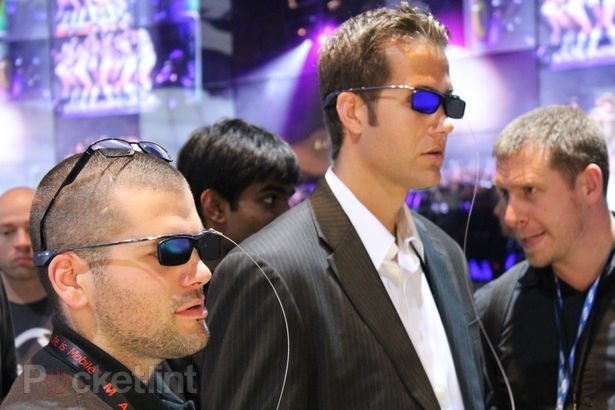
Attention 3D Electronics Manufacturers – I Don’t Care

Speaking solely for myself (and anyone that doesn’t feel like looking ridiculous in the comfort of their own home). 

Here’s a little missive to the electronics manufacturers who, in the quest to try to bring us new technology that we will feel renders our existing technology obsolete have been investing billions in research and development to bring us 3D cameras, video cameras, monitors and televisions.

Do you really think that people are going to sit around the living room wearing huge black 3D glasses?

image

I find it sort of sad because one of my favorite camera makers- Sony is one of the leading pushers of this technology.  It would have been nicer if that money was spent developing faster internet, sharper displays, lighter laptops, compact cameras with large sensors and longer than 5 times zooms, or any other number improvements to existing technology rather than trying to sell the public on a technology that in my estimation very few people really care about.

Seriously?

image

image

image

image

image

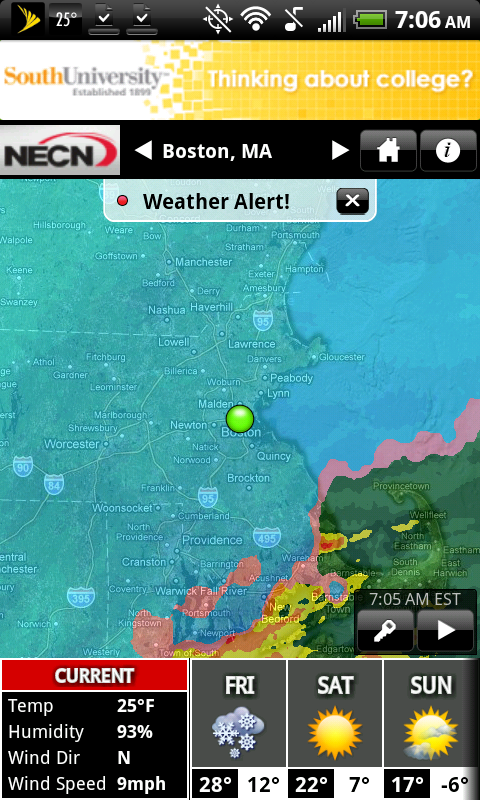
Screen Shot From NECN’s New Android Weather App- Thanks Matt Noyes

The app is free and I just took a screen capture of the current map they provide. Best free weather app I’ve ever used. This screen shot was taken from my HTC EVO just minutes ago.

GMG Tech Talk- Mobile Me- Don’t Do It!

image

Many of you may know that I’ve entered the world of Apple computing with the purchase of a macbook pro.  It’s a 13 inch model with a 4GB of RAM upgrade.

I’m in general a fan of apple products but I’m not blinded like some apple fanboys who claim that everything they do is gold.   In my limited time with the macbook I’ve seen some things it will do much better than the way I can do them on my PC but also some things  the PC with Windows 7 does better than the mac.

Windows 7 is a really huge upgrade in the operating system over all previous versions from Microsoft.  The filing system and ease of use and integration of products using Windows Live make it crazy simple to create content for blogs (something I know a little about).

To be fair I’ve only spent a little time with the macbook but in my research to find  desktop blogging software like the Windows Live Writer on a Mac, all of the mac forum users reiterate over and over that there really is no product that is nearly as good for desktop blogging as the Windows Live Writer which comes free with Windows 7.  There are versions for the mac such as Marsedit and Ecto but they both charge for the software and they are missing key components of  desktop blogging software such as scheduling a post for posting at a certain date in the future.  If you create as much content as I do for the blog it is essential for me to be able to schedule posts out into the future.  We keep an hourly schedule of new posts at the top of the hour every hour from 6AM-6PM with an occasional overnight post thrown in if there is something timely that we want to get out.  So that feature being missing is brutal.

I don’t want to create a post and have it uploaded directly to the blog because often times I create 5 posts in an hour and I don’t want them all going out at once.  They need to be spaced out.  Of course I could go back in to the blog and edit the times online but the post has already been delivered to the people who subscribe to the GMG rss feed and view it in a reader like Google reader.

That is just one example but it is significant (to me anyway)

Things that I’ve found to be way more polished on the Macbook than on the PC using Windows 7- iMovie for editing movies although you can create movies way faster with Windows Live Movie Maker using the auto-movie function, the options are not going to look as polished as they will with iMovie on the Mac.  iPhoto software is much more polished on the Mac than it is using Windows Live Photo, and Pages will make far more stunning brochures than you will with the Windows equivalent.

There is one thing that I’ve discovered about Apple’s mobile me product that is beyond horrible and everyone should know about because you could be in for a world of hurt if you rely on this system of syncing your data between all your Apple devices “in the cloud”.  The cloud is the future for sure.  Saving your pictures to sites like Flickr, Photobucket or Picasa is a brilliant way to store them as long as you physically back the pictures, videos or documents up onto external hard drives as well.

I would say the same thing for Apple mobile me but there is a huge catch that is probably not explained to people when they buy their iPhones or Macbooks.  You pay $99 per year for the privilege of uploading your picture, video or documents to mobile me for sharing anywhere you have access to a computer.  (You can get a discount the first year to something like $69) The problem is that they are telling people that they can host their iWeb websites on mobile me and also their content to mobile me but what they don’t tell you is that if you ever decide to stop paying that $99 per year and opt out of mobile me that your content will be deleted after a short grace period!

Holy crap I couldn’t even imagine creating a website using Apple’s iWeb, hosting it on mobile me, and then being locked in to paying that $99 vig every year or else all that content that had been created and all those links from pictures to where they belong on the sites would all be broken.  All you would have is a bunch of little red x’s where pictures are supposed to be.

They cap you out on mobile me at 20GB of storage to the cloud per year.  For most people that would be fine but I can tell you that for GMG we would smoke that in a couple of months.

So people I would tell you not to pay for this mobile me and be locked in to that $99 per year under penalty of losing all your stuff.

A difference between mobile me and the Windows Live Sky Drive is that Windows Live Sky Drive gives you 25 GB of storage to the cloud (it’s virtually the same setup as mobile me) but they give it to you for free.

Hey Apple Fans

What are your thoughts on the newly released Macbook Air?

Looks pretty sweet.

I’m wondering if it has enough power to edit videos and photos with ease.

The one I’d want is the 13 inch with a 4gb RAM upgrade. In that configuration it comes in at $1399- a little too steep unless I sell a whole lot of photos.

GMG Tech Talk- Doodle Easy Scheduling

image

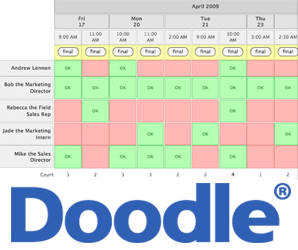
Doodle is a free online program which allows a group of people to check off a bunch of dates that they are available for a get-together or meeting.  It aggregates all the dates and gives the best dates for which the most people can attend.  So simple and so useful instead of doing the ten person email chain back and forth thirty times to figure it all out.

Easy Peasy