A few weeks ago I saw a group line up for a picture at the Santa Monica Pier and then the picture taker reached into their bag and took a picture with an iPad. With technology getting smaller and smaller it is quite a site when someone pulls out a camera as big as a sheet of loose leaf paper and asks people to say “cheese”. I understand that the camera is intended for video chat, similar to the function on a PC, but I don’t know what to say about this. The only acceptable thing to do is stop this before this becomes an epidemic. Hasn’t the smartphone & tablet technology taken over enough of our lives? We see enough people checking their smartphones in the car. What’s next? I will flip if I see someone driving and reading a magazine on their iPad! I think there are very few things that you can call someone out publicly on. This is definitely something that I feel is perfectly ok to do and I encourage it before people get too ridiculous with their iPad and this becomes acceptable. If you see someone on the boulevard doing this please snap a picture of them and tell them that the best camera is not always the one that is with you.
Can you imagine if you saw someone pull this out at the part of the concert when people whip out their cell phones for the part of the concert that used to be meant for lighters?
Thanks – Patrick
Spread The GMG Love By Sharing With These Buttons:
So for those of you who know me you know that for 8 months of the year I wake up for work at 3:45AM 7 days a week to get down our commercial lobster dock.
It’s a grueling year doing a lot of repetitive work and it’s very physical as well. So when I get home I’m uusually tired. Getting home usually between 6-7PM eating dinner and then trying to stay awake to spend some time with the family.
The Mrs and I try to get out for dinner once or twice a week and it’s nice to not be falling asleep in my plate. So I drink lots of coffee and if I’m really really dragging I’ll chug down a red bull to try to help me stay awake past 9PM.
Anyway I saw this online ad for Aeroshot breathable energy and it seemed intriguing. Instead of having to consume the liquid and sugar of the red bull take a couple of huffs of the AEROSHOT. On the AEROSHOT website they had a twitter page so I followed it.
Then while on twitter there was a promotion for a free sample so I signed up. It came to the house about a month ago but last night we had a dinner party to go to and I was pretty beat so it seemed like a good night to give it a go.
In the video above you can see the packaging and how the system works.
Here are my findings after using it last night:
It was very easy to use, you pull it from each end so it opens up and then put it in your mouth and when you close it a certain amount of what seemed like a crystalized powder entered your mouth where it dissolves and gets ingested into your body. you don’t get all of it with one burst, I did about 5 or six inhales.
You immediately get a taste of lime followed by a sharp bitterness. I had just brushed my teeth before so the taste wasn’t all that great to me but I think I would opt for something a little sweeter for a flavor instead of lime. A berry flavor would probably counteract the bitterness better than lime.
Within a couple of minutes I felt a rush and my heart rate increase. It was very noticeable that my alertness was heightened and it was more than the rush you would get from a red bull, 5 hour energy or drinking an espresso.
The alertness and heart rate increase lasted about 2 hours.
Spread The GMG Love By Sharing With These Buttons:
I’ve been loving the new camera. As you all know I constantly bang the drum of keeping your equipment on the smaller side so you are more likely to bring it with you.
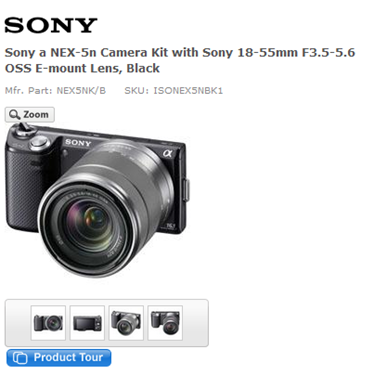
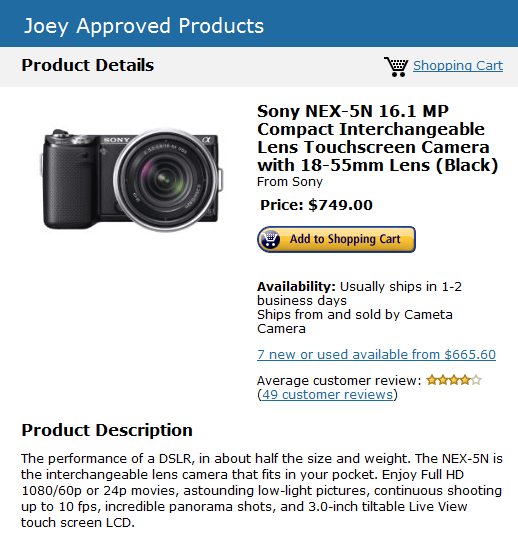
The Sony NEX-5N to me has been the best compromise of price/size/image quality/build quality/features
The door that Sony cracked open with the NEX-5 has been blown wide open by the NEX-5N. Besides making the body marginally thinner and adding a touchscreen, Sony endowed the NEX-5N with a truly supreme image sensor. Its 16-megapixel CMOS sensor competes with the Nikon D7000 and Canon 60D (each company’s latest and greatest midrange DSLR) for noise performance, while delivering image quality that leaves other mirrorless cameras in the dust. If the NEX-5N had a universal microphone input and a more generous battery, it’d be a formidable DSLR replacement for professionals as well. As it stands, it’s the top choice for any hobbyist looking for the best image-quality-to-camera-size ratio.
I’ve been absolutely loving mine. Soooo much fun to shoot with. I highly highly highly recommend this camera for anyone from the person that wants the image quality of a large chunky DSLR in a much smaller form factor.
I’ll say it again though my mantra is if you only own one camera it should be one that you feel comfortable carrying around with you. This won’t fit in your pants pockets like the Canon Powershot s95/s100 or Sony HX9V but it will blow away their picture quality with it’s larger sensor.
Not every camera is right for every person. There are always tradeoffs in the balance of price, camera size and weight, image quality, video features, zoom length, ect.
Above all else in my opinion I feel that the old saying “The Best Camera Is the One You Have With You” is the most important factor.
So along that line of thinking, a big DSLR may give you incredible picture quality and an ability to use fancy high quality lenses that are super fast and can capture wonderful quality in low light but if you don’t have it with you because you (like most people) aren’t going to lug a 5 lb camera around everywhere with you then I feel like if you’re only going to have one camera it should be something you are more likely to have on your person.
Let’s face it, everyone wants to travel light and weather you are on vacation or if you are a blogger or someone taking pictures of your children at a birthday party, it is far more convenient to have something you can whip out of your pocket to take a photo.
So with that in mind, I will break down my camera recommendations and explain what type of shooter each camera is best suited for.
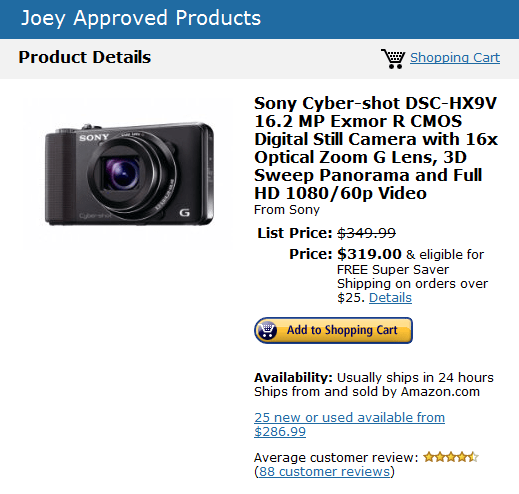
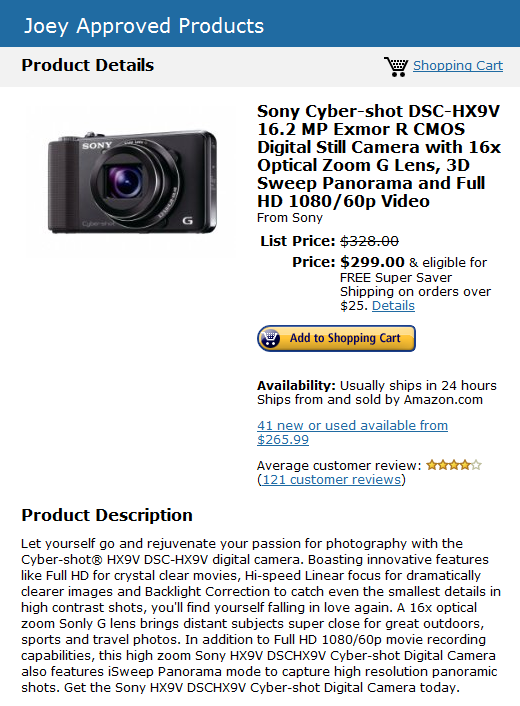
The Sony HX9V (my current pocket camera)
Pluses-
It has a tiny footprint and can easily be pocketed and taken anywhere. It has a 16 times zoom which can get me across the harbor and zoomed in on a boat from far far away. It takes great video and features a video mode which will take 60 frames per second in HD which is rare for a small camera at it’s price point. It has a killer panorama mode.
The minuses-
It has a smaller sensor size compared to the Canon Powershot S95/S100. Sensor sizes are one of the most important parts of taking good photos in low light. It is what sits behind the lens and collects light (photography is all about collecting light). The larger the sensor, generally the better the quality of the images in low light. There currently is no camera that has a 16 times zoom and a large sensor that you can put in your pocket.
Hence the ever present tradeoff. In my case, pocketability and a need for a long zoom trumps a larger sensor with a limited zoom or fixed pancake lens that only gets you the equivalent of a 4 to 5 times zoom. I simply need that ability and reach in my walk around camera. However if you don’t care about the zoom feature or video capabilities there are better cameras out there in the similar small pocketable package, namely The Canon Powershot S95/S100.
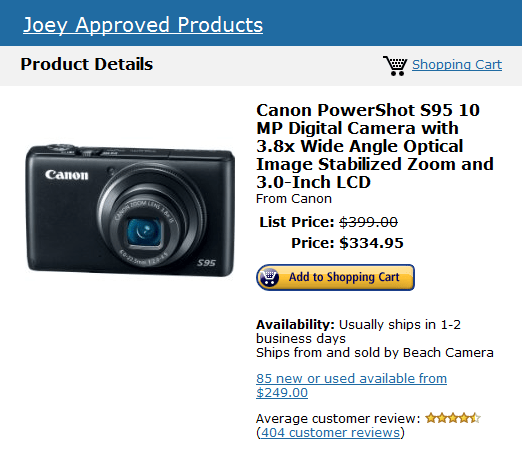
The Canon Powershot S95/S100
If zoom is not important to you because 95% or more of your photos are taken indoors of family members or street scenes, the Canon Powershot S95 (a great value as it is last year’s model) and this year’s updated S100 are my top picks.
Pluses-
They have large sensors which are fantastic for gathering light. They also have super fast lenses which freeze the action and give you super sharp images.
Minuses-
The tradeoff is you get that large sensor in a small pocketable package but you won’t get more than a 5 times zoom. That is one third of the zoom of the Sony HX9V. It will take a much better picture than the Sony HX9V in low light and some of my favorite photos taken in 2011 were taken with this camera during the short time I had it but the short zoom drove me nuts. that isn’t to say it would drive you nuts. Lots of folks don’t care to take pictures of objects so far away and the lack of a huge zoom wouldn’t matter at all to them, especially when you consider that you can get better pictures out of the camera.
Now if you don’t care about a little extra weight you could get yourself my second camera which is an interchangeable lens camera, this brings us to the Sony NEX-5N
The Sony NEX-5N
If you don’t mind a little extra weight, don’t want to sacrifice image quality because of a smaller sized sensor in a pocketable long zoom camera or be limited by the zoom range in a large sensor short zoom range camera then I feel the Sony NEX-5N is a little beast of a camera.
It has the same sensor as cameras that cost almost double it’s cost, has awesome video capabilities and a ton of features that many camera magazines and gadget websites rave about.
I am over the moon about mine and the possibilities I’m discovering every time I pick up the miniature tank.
Pluses-
Large sensor size, awesome video capabilities, smallish for a interchangeable lens camera(I can still put it in a jacket pocket), the ability to use all types of different lenses for different types of shooting.
Minuses- Too large to fit in pants pocket, lenses can be expensive.
So there you have it. I still will use my Sony HX9V when I need to be able to keep a camera with me in my pocket at all times and for more serious shooting I’ll bring out the NEX-5N. Those options work for me. They may not be your ideal camera but if you tell me what type of things are important to you you can always ask me and I’ll try to help you make a good decision for your next camera.
These are the things to think about and decide how important they are to you-
Size- do you need to carry it in a pocket, a jacket pocket, or does that not matter?
Zoom- Do you need a long zoom 9if not you can get a great pocketable camera for not a lot of dough.
Photo Quality- If the absolute best photo is what you want and you don’t care about the size of the camera or cost.
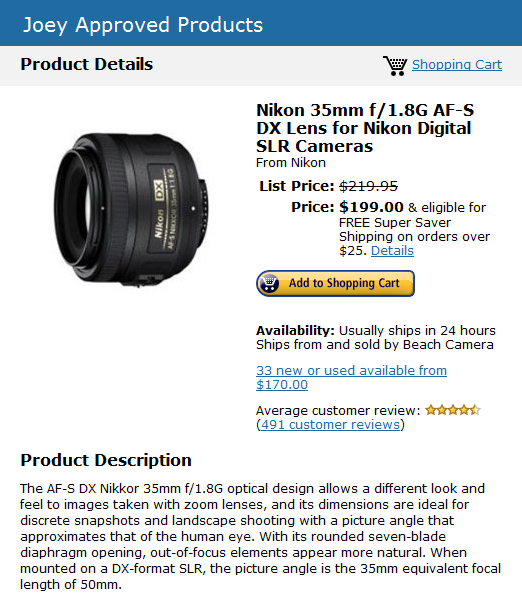
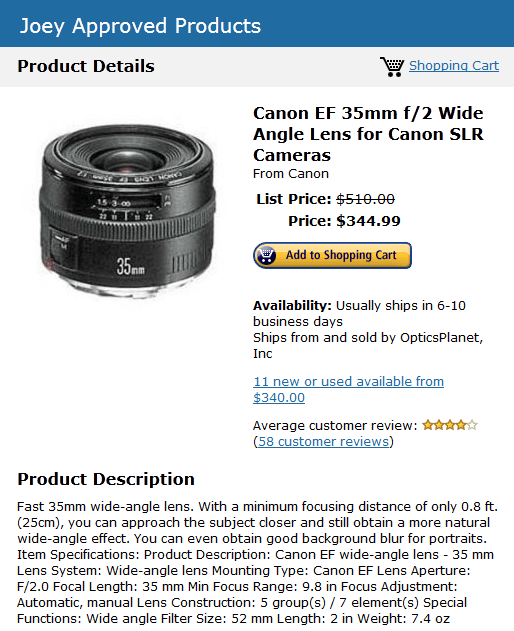
If you already have a large DSLR be it Canon or Nikon or whatever the best thing you could do to upgrade your photos is get yourself a fast prime lens. I love the 35mm range on a standard (not full frame) DSLR this will give you a classic focal length of the same perspective of whet your eyes see. the thing about a prime lens is because it is set a t a fixed focal length the quality and speed of these will give you outstanding results compared to the zoom lens you camera came with (usually the standard 15-55mm) kit lens. Kit lenses usually have slow apertures which won’t freeze the action for you in low light like a fast 35mm 1.8 lens. I got the Nikon version for The Mrs and it hasn’t left the mount of her Nikon D40 since we got it for her. be awar with the fixed lens you have no ability to zoom. You zoom with your feet by getting closer to your subject. the thing about the fast primes though are that your image are generally so sharp you can crop them right down in post very easily.
I highly recommend a 35mm prime for those with a Nikon or Canon or Pentax or olympus DSLR.
Here’s the one I got the Mrs for her Nikon-
and here is the Canon version-
Spread The GMG Love By Sharing With These Buttons:
This article from Lifehacker sums up online music purchases well. I actually have used and continue to use all three and agree pretty much with everything in this article. I used to buy everything through iTunes but now buy my music through the amazon store and then import them to iTunes because the music is usually about 10-30% cheaper on Amazon MP3. Check out Amazon Music here
Google opened its new music store to all comers in the US this week, touting its partnerships with music labels and indie musicians, and its broad reach thanks to the Android Market. The new store has millions of songs for sale, but whether it’s a game changer, serious competition for iTunes and Amazon MP3, or the best online music store out there is another question entirely. Let’s take a look at each service based on its features.
Each music store is a little different. This showdown is all about the music stores that these companies offer—not their respective players, applications, or services. We can’t help but mention them in terms of usability and integration with the store and the user experience, but we’re going to try and focus on the features of the stores and steer clear of the bugs or quirks of each player.
Summary: To be fair, I’ve only had a few hours to tinker with the new device, but I can already say that there are a bunch of ways the Kindle Fire is better than the iPad.
My Kindle Fire arrived last night. I was surprised to find myself excited, waiting for it to arrive. This was especially surprising, because in September, I detailed 12 reasons you might NOT want to buy a Kindle Fire.
To be fair, I’ve only had a few hours to tinker with the new device, but I can already say that there are a bunch of ways the Kindle Fire is better than the iPad.
Now when I recommended people get this I never dreamed anyone would come out and say a $200 Kindle Fire would be better than a polished excellent device as the iPad at almost 3 times the price. I figured it would be pretty damn good and the thing about it that would be killer was that $200 price point.
This is quite the coup. I’m really eager to hear from those of you who got one yesterday or today in the mail from my initial recommendation
I’m dying to hear from you guys. How do you like it?????
Paul Morrison I have some specific questions-
How is the screen?
Did you watch any youtube videos on it?
Did you access email on it?
Is it a value at $200 and who is it the perfect gift for if so?
Summary: I have the new Kindle Fire from Amazon in my hot little hands and I’m not letting go. It’s going to take the tablet market by storm.
I thought about posting an article consisting of a single word to describe my first impressions with the Kindle Fire. The word is:
Wow
Figuring this might be a lacking a little in the detail department, I decided to write something longer. So here you go:
Wow!
Kidding aside, the Kindle Fire arrived at my doorstep in an unassuming brown cardboard box yesterday afternoon. I’ve spent several hours playing with it, trying different apps on it, and hooking it up to Eclipse to see if I could write and debug programs for it. And let me just say, I’m impressed.
The Kindle Fire is a sweet little tablet, exceeding my expectations in almost every way. Especially considering the $199 price. Where do I start?
The screen is bright and colorful, a pleasure to read and play.
The size is perfect; much easier to carry around than a 10 inch tablet. It even fits in my big pockets.
The Fire’s screen has true independent two-finger multi-touch. Games like Pew Pew 2 have no problem at all with their joystick-like controls.
All the Amazon user interfaces are beautifully designed and color coordinated.
Integration with the Amazon ecosystem of books, movies, and apps, is airtight and natural.
The Fire is fast! App switching, page turning, video watching, no matter what you throw at it, it just purrs along. I’ve read reviews about it being sluggish, but that hasn’t been my experience at all.
It uses the latest version of Android for which source code was available (2.3.4 API level 10). This is important because it’s the first version with decent APIs for native gaming. According to a source at Amazon who asked not to be named, they are working to port Android 4 to the Fire now that the code is available.
Amazon did a great job handling navigation with no hardware buttons without taking up a lot of the screen (better than stock Android 3.x or 4.x IMHO).
The Fire allows side-loading of apps, so I can install apps from web sites or email attachments (great for developers and enterprise users).
Paul Morrison Chimes in with a short review and answers to my questions–
I’ll write a longer review as soon as I get feedback from Sue who is an avid Kindle reader. But in answer to your questions:
How is the screen?
The clarity is amazing.
Did you watch any youtube videos on it?
Yes, within moments of thinking of youtube and typing Tim Minchin I had a selection of his youtubes, selecting Prejudice I was watching a crystal clear video in the right format. Nicely done. You don’t even have to think about it.
Did you access email on it?
Even though it is Sue’s I checked it out. Took about 30 seconds to put in some settings for one of my gmail accounts. Very simple and well laid out .
Is it a value at $200 and who is it the perfect gift for if so?
As I was messing with it just now and getting hooked on listening to the audio book of Abraham Lincoln Vampire Hunter (gotta buy that now) I think the answer is easy. This Kindle is for someone who wants to ingest input from the outside world. Movies, (the trailers look awesome) TV (samples look great), books (That is Amazon’s ecosystem), audiobooks. The layout to consume that stuff is simple, easy, elegant. I tried to think of myself as a grumpy old person born before the internet was invented and I could easily see figuring out the bookshelf and how to go get all of this stuff. Amazon is the perfect portal to all of that stuff. Buying stuff from Amazon.com also looks way to easy. 1 clickety click and the boxes show up.
I need to have Sue read a book to compare to the Kindle Reader. The fact that the screen is lit and not passive might be a dela breaker. Battery life might also be since the Kindle Reader lasts a month to the 8 hours on the Kindle Fire.
My last word: This thing is great because competition is what makes for good stuff. The iPad has some competition. They may lose the chunk of people who want to consume some good text/video. The iPad2 just has a lot more stuff. For the geek who wants everything this falls short but fortunately most of us aren’t geeks.
Spread The GMG Love By Sharing With These Buttons:
Fw: Your Amazon.com order of "Kindle Fire, Full Color 7"…" has shipped!
Greetings Patrick J Ryan! We thought you’d like to know that we shipped your items, and that this completes your order.
Your estimated delivery date is: Wednesday, November 16, 2011
If you ordered one let me know if you got your shipping confirmation as well!
And Gizmodo Raves About It!-
Kindle Fire Review: The iPad Finally Has Serious Competition
The Kindle Fire is stuck between e-ink minimalism and gleaming iPad decadence. That could either make it the goofy middle child in the tablet family, or a singular wunderkind. But the Fire will not be overlooked. Apple: Be afraid.
Why it matters
Amazon isn’t just a bookstore. Nor is it a music store, shoe store, video streaming service, or newsstand. Amazon has wrapped all of these things together into a rich, easy way to suck down almost every conceivable form of media with one key: Prime. But Prime has been stuck behind the tangled butterface of Amazon.com—the site is a mess, a cage. This Kindle is meant to change all that, to not only be a Better Kindle, but a direct conduit to all of Prime’s awesomeness: the missing piece.
And what a piece it is, right? It’s hard to believe it sprung from the same hatchery as the Kindles of yore, with its dual-core processor, 512 MB of RAM, and a gorgeous 7-inch, 16-million color display beaming a custom Amazonian Android build, made specifically for Kindle’s essence.
If the Fire succeeds, everything changes for Amazon. And for Apple as well.
Using it
The Fire doesn’t feel like any other Android tablet—and that’s a very, very good thing. From the minute you turn it on, the device is puzzlingly simple. Where’s the home screen?, someone might ask you. All you see is a shelf, stacked with whatever you’ve looked at recently: novels, magazines, apps, TV episodes—everything. The emphasis is squarely on picking out stuff to stimulate your eyeballs (and ears) with—all else is secondary. This makes for a UI that’s not only simple, but intuitive. You don’t have to think about how to use the Fire, because unlikeApple’s dodgy attempts at interface metaphors, Amazon’s works perfectly: here’s my shelf of things. Which thing will I choose?
Of course, there’s more than the shelf. A search bar at up top does the obvious across everything you own, and small organizational tabs inconspicuously span the upper boundary of the screen: newspapers and magazines, books, music, video, docs, apps, and a web browser. Need more to consume? The Store is always at most two clicks away. Tap Books. Tap Store. Here’s the entirety of Amazon’s catalog, neatly organized, easily downloaded.
The reason Apple should be afraid isn’t because the Kindle Fire is going to blow away the iPad based on spec. The iPad is $600, the Kindle Fire is $200 though and the reason apple should be worried is because tehre is finally some serious competition price wise.
That $200 price point for a great tablet (Kindle Fire) is going to put a lot of units in the hands of the population and those are people who won’t pony up the huge dough for admittedly a great product (the iPad) but at three times as much cost.
For those of you who ordered one for yourself, I can’t wait for you to write in and give me your impressions! Patrick Ryan this means you! The 16th is just two days away!
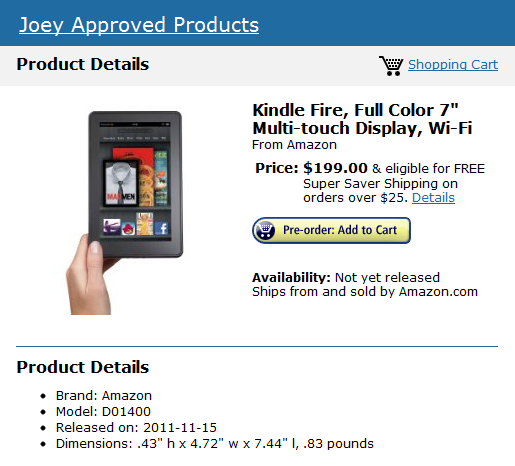
Here’s your link to order ‘em and get some Christmas shopping done!
Spread The GMG Love By Sharing With These Buttons:
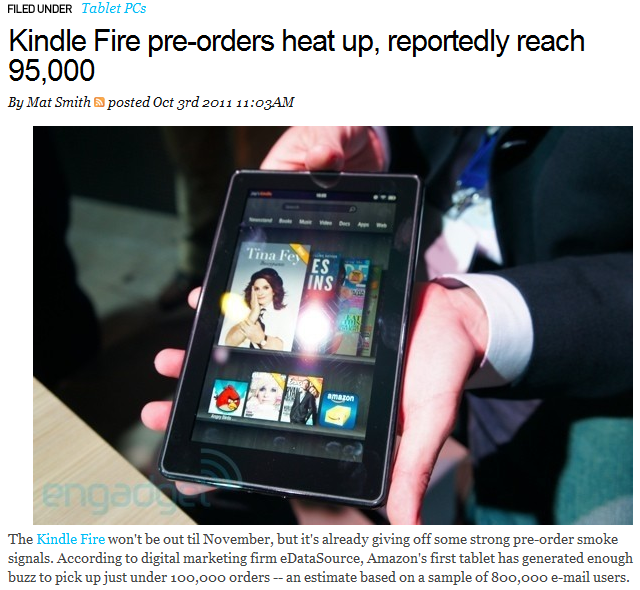
Not sufficiently amped up for the impending release of Amazon’s first tablet? That could very well change as the Seattle-based company’s just made its thousands-strong app pot a little sweeter. After reminding the product-buying populace a few days ago that the newly birthed Kindle Fire is, indeed, atablet with access to a boatload of Android apps, Bezos and co. are now upping the slate’s ante by announcing the availability of Hulu Plus and ESPN ScoreCenter. It’s an obvious swat at the Nook Tablet’s two greatest lures and could sway indecisive customers back from the brink of Barnes & Noble’s beguiling clutches.
It’s becoming more and more apparent that the Kindle Fire Color Tablet is going to sell like hotcakes.
The Amazon Fire Tablet is going to be this year’s Zhu Zhu Pet and past year’s Cabbage Patch Doll.
It’s brilliantly priced for people who don’t have to do everything an iPad can do or as seamlessly. Also there are more pixels than the already fantastic iPad screen? This will sell well, really well for all those folks who can’t justify an iPad at the same price of a decently spec’d laptop.
You can and should pre-order one for Christmas presents if you don’t want to spring ALL the money for an iPad.
Display 7″ multi-touch display with IPS (in-plane switching) technology and anti-reflective treatment, 1024 x 600 pixel resolution at 169 ppi, 16 million colors.
Size (in inches) 7.5″ x 4.7″ x 0.45″ (190 mm x 120 mm x 11.4 mm).
Weight 14.6 ounces (413 grams).
System Requirements None, because it’s wireless and doesn’t require a computer.
On-device Storage 8GB internal. That’s enough for 80 apps, plus either 10 movies or 800 songs or 6,000 books.
Cloud Storage Free cloud storage for all Amazon content
Battery Life Up to 8 hours of continuous reading or 7.5 hours of video playback, with wireless off. Battery life will vary based on wireless usage, such as web browsing and downloading content.
Charge Time Fully charges in approximately 4 hours via included U.S. power adapter. Also supports charging from your computer via USB.
Wi-Fi Connectivity Supports public and private Wi-Fi networks or hotspots that use the 802.11b, 802.11g, 802.11n, or 802.1X standard with support for WEP, WPA and WPA2 security using password authentication; does not support connecting to ad-hoc (or peer-to-peer) Wi-Fi networks.
USB Port USB 2.0 (micro-B connector)
Audio 3.5 mm stereo audio jack, top-mounted stereo speakers.
Included in the Box Kindle Fire tablet, U.S. power adapter (supports 100-240V), and Quick Start Guide.
$199.00 Free Super Saver Shipping
Pre-order now to reserve your place in line
Our all-new Kindle Fire will be released on November 15, 2011. Orders are prioritized on a first come, first served basis.
Ships from and sold by Amazon Digital Services. U.S. only.
Movies, apps, games, music, reading and more, plus Amazon’s revolutionary, cloud-accelerated web browser
18 million movies, TV shows, songs, magazines, and books
Amazon Appstore – thousands of popular apps and games
Ultra-fast web browsing – Amazon Silk
Free cloud storage for all your Amazon content
Vibrant color touchscreen with extra-wide viewing angle
Fast, powerful dual-core processor
Amazon Prime members enjoy unlimited, instant streaming of over 10,000 popular movies and TV shows
This thing has more pixels than the iPad at less than half the price? If anyone has seen the iPads gorgeous screen you know that’s a big deal. The thing will play windows videos as well as mac videos and best of all it supports Flash, so all those flash based sites you can’t access on an iPad, you can on the kindle Fire.
If they were both the same price I’d buy the iPad all day long but when you take that $200 price into account it’s tough to beat for value.
Best move is to put in a pre-order for one ASAP and even if you change your mind you can cancel the order before November but best case scenario is you sell it for double on eBay to someone who desperately needs one to give as a Christmas present.
A laptop and/or pc replacement for $200 and will do everything that 90% of people need it to do.
Is it a replacement for a power user? Obviously not, but power users only make up 10% or less of the marketplace IMO and the Kindle Fire will capture the other 90% of the marketplace’s needs. This would be PERFECT for my mom, my wife, my nephew or niece, my sister, just about anyone whose computing use is 90% Facebook and 10% web browsing.
No-Brainer as my boy Patrick Ryan said to me.
Spread The GMG Love By Sharing With These Buttons:
I started this topic on Twitter, but I thought it would be fun to include your audience in the discussion. This isn’t about trying to get something to trend on Twitter – its more about creating an exclusive Twitter channel for Gloucester, MA. I just ran into a similar situation with Salem this month. There’s all kinds of Salems out there but only one Salem, MA. Going to #SalemMa to find info on their busiest month (Salem = Halloween) is much easier than visiting #Salem#MA.
I noticed that #Gloucester on Twitter is totally cluttered with other Gloucesters – mainly Gloucester, England & Gloucester, New Jersey. It’s enough to make someone have to dig for info on Gloucester MA, and not very user friendly.
I then checked #GloucesterMa and noticed that @GDTnews started it and think it’s a great idea. It fine tunes the aggregation of our collective data and makes finding Gloucester Mass info on Twitter so much easier. If we follow a pattern of posting to #GloucesterMa, we can collectively Tweet occasionally on #Gloucester#MA something like – ‘Looking for info on #Gloucester#MA? Try #GloucesterMa!’
I’m with @GDTnews on this and my vote is for #GloucesterMa in all Gloucester-centric tweeting!
Well it’s a great topic Bill brings up and I should just state that there shouldn’t even be a debate. The official Gloucester MA hashtag for twitter should be #GloucesterMA and not two separate #Gloucester #Ma. The answers should be plain as day when you click on those respective hashtags on twitter.
When you click on #Ma you’re going to get anything and everything that anyone has used for the #Ma including everything in Massachusettes as well as a bunch of mother tweets. That alone defeats the purpose of the hashtag which is intended to drill down your results. On top of that with #Gloucester #Ma you use 15 characters as opposed to 13 characters with #GloucesterMa Those two characters are valuable real estate in a 160 character max tweet.
To make it more clear-
Click here for twitter search results for #Gloucester and then here for #Ma and take note of what it returns (you don’t need to have a twitter account to do this)
as opposed to the far better option-click the link- #GloucesterMa
That should make things crystal clear as to the far superior option.
Thanks Bill @kidns and @GDTnews for bringing it to our attention. No need for a poll, this is case closed, from now on I’ll be using #GloucesterMa unless of course I need those last two characters in which case the Ma gets the ax.
Oh and BTW, you can follow your boy Joey here- @Joey_C
Spread The GMG Love By Sharing With These Buttons:
I have an iPad, I love it. I am not an apple hater, they make fantastic hardware. You pay for the luxury of using apple products dearly. I happen to think that I can create my blog way faster and efficiently using Windows 7 than a Mac but that isn’t what we’re talking about in this post.
Right now I’m going to tell you why I don’t buy my online music through iTunes any longer.
For a cell phone I have an android HTC EVO. The thing can do a crazy amount of things way better than an iPhone because android’s operating system allows it to be customized way more than what you can do with an iPhone. This is good AND bad.
For most people (read non geeky tech folks) I would recommend an iPhone over an android one. The reason being that because android is SO customizable there are often little quirks that pop up like battery drainage if you are running some rogue app and other things that occasionally drive me nuts but because my android phone lets me do certain things for the blog way more efficiently, that’s why I’ll be sticking with android and the android platform. Google basically pumps out a stupid number of awesome applications that integrate so well with it and they charge nothing for them but for people that don’t need all those bells and whistles the iPhone works great.
Anyway, here’s my second attempt to get back on track. Online music purchases.
Amazon has an mp3 store and app for amazon which allows you to buy any music and it stores it in the cloud AND allows you to download it and sync it wirelessly with all of your devices.
It bothers me that when I pay $1.29 for a song in my iTunes account, I can’t just find it in my iTunes music library and drop it into my android music folder for listening on my cell phone with headsets or through bluetooth. I have to go in and convert the file over.
With the Amazon mp3 store you click to buy the song on your desktop or your phone and once and it downloads it to the cloud for listening anywhere, then it syncs it with your desktop computer and cell phone AND here’s the kicker….. wait for it…….. syncs it with my iTunes account. So you buy it for cheaper and you can instantly listen to it on all your devices using Amazon Cloud Player or you can pay more for it on iTunes, have to manually convert and then add the song to each of your other devices.
On top of that Amazon’s Cloud Player is free and will store 5GB of your music to the cloud instead of having to store it on your cell phone which leaves free space on your device for applications.
Here’s a video explaining it
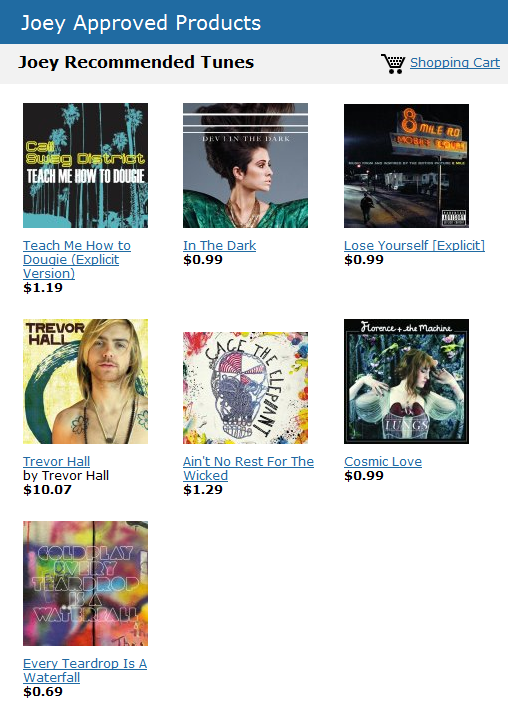
Here is the music I’ve recently downloaded-
For those of you who are gonna get the Kindle Fire this is a great way to buy and store your music. Once you fire up that Kindle Fire your music will sync right to it. Brilliant, the way it ought to be!
Spread The GMG Love By Sharing With These Buttons:
The layout of how the photos are displayed in album and slideshow formats are probably the nicest I’ve seen. So I gave it a whirl creating one from The Bean’s soccer match last weekend. Click on either hyperlink above to see what I mean.
Super easy to create as well. You simply select the photos you want to add and give the album a name. It allows you to share it by hyperlink as well and people can comment on them.
If you haven’t tried it yet, get to it (it’s free too)
The Kindle Fire Color Tablet is going to sell like hotcakes.
The Amazon Fire Tablet is going to be this year’s Zhu Zhu Pet and Past year’s Cabbage Patch Doll. The thing where everyone will be killing themselves to get and there won’t be enough to go around creating a frenzy to get them. you heard it here. September 28th, 2011. Write it down.
It’s brilliantly priced for people who don’t have to do everything an iPad can do or as seamlessly. Also there are more pixels than the already fantastic iPad screen? This will sell well, really well for all those folks who can’t justify an iPad at the same price of a decently spec’d laptop.
You can and should pre-order one for Christmas presents if you don’t want to spring ALL the money for an iPad.
First off Facebook is the king. If you want to promote online Facebook is far more accepted into folks lives than Twitter but I would just like to offer a tip to those small business owners that are using twitter either personally or to promote their business.
I use twitter and like twitter but I fully recognize the power of Facebook. Google plus is just not seeing very much traction other than the folks who are signing up to check it out but very few are actually using it like they use Facebook. If Google Plus came out at the same time as Facebook it would have eaten their lunch but so many folks are heavily invested in their Facebook network and aren’t about to abandon it any time soon for a network where there’s barely any activity.
If you only tweet promotions and never respond or add anything funny or interesting other than trying to pimp your product or service I’m highly likely to either unfollow you or skip right over your tweets figuring that it’s just another in a long list of pitches.
That may sound curt and it’s not to say that you shouldn’t promote your business occasionally but to just hammer away with sales pitch after sales pitch or 3-7 posts in a row, If people are like me they scroll right over your tweet.
Spread The GMG Love By Sharing With These Buttons:
The Kindle Fire Color Tablet is going to sell like hotcakes.
The Amazon Fire Tablet is going to be this year’s Zhu Zhu Pet and Past year’s Cabbage Patch Doll. The thing where everyone will be killing themselves to get and there won’t be enough to go around creating a frenzy to get them. you heard it here. Sepember 28th, 2011. Write it down.
It’s brilliantly priced for people who don’t have to do everything an iPad can do or as seamlessly. Also there are more pixels than the already fantastic iPad screen?
This will sell well, really well for all those folks who can’t justify an iPad at the same price of a decently spec’d laptop.
You can and should pre-order one for Christmas presents if you don’t want to spring ALL the money for an iPad.
Display
7″ multi-touch display with IPS (in-plane switching) technology and anti-reflective treatment, 1024 x 600 pixel resolution at 169 ppi, 16 million colors.
Size (in inches)
7.5″ x 4.7″ x 0.45″ (190 mm x 120 mm x 11.4 mm).
Weight
14.6 ounces (413 grams).
System Requirements
None, because it’s wireless and doesn’t require a computer.
On-device Storage
8GB internal. That’s enough for 80 apps, plus either 10 movies or 800 songs or 6,000 books.
Cloud Storage
Free cloud storage for all Amazon content
Battery Life
Up to 8 hours of continuous reading or 7.5 hours of video playback, with wireless off. Battery life will vary based on wireless usage, such as web browsing and downloading content.
Charge Time
Fully charges in approximately 4 hours via included U.S. power adapter. Also supports charging from your computer via USB.
Wi-Fi Connectivity
Supports public and private Wi-Fi networks or hotspots that use the 802.11b, 802.11g, 802.11n, or 802.1X standard with support for WEP, WPA and WPA2 security using password authentication; does not support connecting to ad-hoc (or peer-to-peer) Wi-Fi networks.
USB Port
USB 2.0 (micro-B connector)
Audio
3.5 mm stereo audio jack, top-mounted stereo speakers.
Included in the Box
Kindle Fire tablet, U.S. power adapter (supports 100-240V), and Quick Start Guide.
$199.00 Free Super Saver Shipping
Pre-order now to reserve your place in line
Our all-new Kindle Fire will be released on November 15, 2011. Orders are prioritized on a first come, first served basis.
Ships from and sold by Amazon Digital Services. U.S. only.
Movies, apps, games, music, reading and more, plus Amazon’s revolutionary, cloud-accelerated web browser
18 million movies, TV shows, songs, magazines, and books
Amazon Appstore – thousands of popular apps and games
Ultra-fast web browsing – Amazon Silk
Free cloud storage for all your Amazon content
Vibrant color touchscreen with extra-wide viewing angle
Fast, powerful dual-core processor
Amazon Prime members enjoy unlimited, instant streaming of over 10,000 popular movies and TV shows
This thing has more pixels than the iPad at less than half the price? If anyone has seen the iPads gorgeous screen you know that’s a big deal. The thing will play windows videos as well as mac videos and best of all it supports Flash, so all those flash based sites you can’t access on an iPad, you can on the kindle Fire.
If they were both the same price I’d buy the iPad all day long but when you take that $200 price into account it’s tough to beat for value.
My prediction, when you want to buy one, for Christmas present’s they will be so backordered you probably won’t be able to get one.
Best move is to put in a pre-order for one ASAP and even if you change your mind you can cancel the order before November but best case scenario is you sell it for double on eBay to someone who desperately needs one to give as a Christmas present.
There’s no way they produce enough for the demand at that price point.
A laptop and/or pc replacement for $200 and will do everything that 90% of people need it to do.
Is it a replacement for a power user? Obviously not, but power users only make up 10% or less of the marketplace IMO and the Kindle Fire will capture the other 90% of the marketplace’s needs. This would be PERFECT for my mom, my wife, my nephew or niece, my sister, just about anyone whose computing use is 90% Facebook and 10% web browsing.
No-Brainer as my boy Patrick Ryan said to me earlier.
Spread The GMG Love By Sharing With These Buttons:
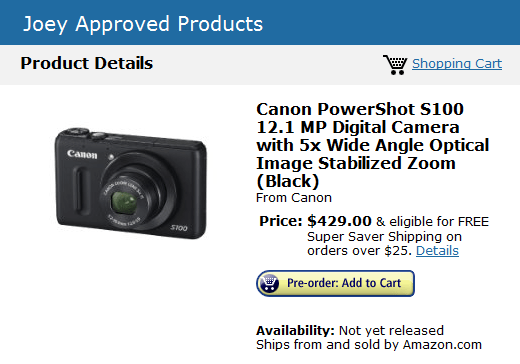
I have been a huge fan of the Canon Powershot s95 and have not hesitated to recommend it to our readers time and time again for it’s compact size and oversized sensor. The Powershot s95 is easy to recommend to people but I should let people know that it isn’t necessarily the best camera for those who want big time zoom range and before I go any further I should tell you that just recently they announced the successor to that camera the Canon Powershot s100.
The powershot s100 was recently announced and you can read about what they added to the specs from the s95 here at one of my favorite tech gadget blogs, Engadget
For the condensed version of the article in Engadget, –
The S100 features improved low-light performance thanks to its f/2.0 lens and new, larger 12.1 megapixel CMOS censor (gone is the CCD of yore). It also has a GPS receiver for embedding location data in your photos.
Both cameras will cost $430, with the S100 set to ship in early November
Right now you can buy the Powershot s95 for $359 which I still would do because I don’t consider the bump up to 1080p video and a slight increase to the sensor worth the extra $70. Either camera will be the best performing camera you can own that you can still comfortably keep in your pocket and take great pictures indoors in low light. Basically this is the perfect carry around camera for 80% of the picture taking population. The only negative with the Powershot s95 or upcoming powershot S100 is that they are limited in zoom range. To date, and believe me when I tell you that I’ve done the research, there is NO camera that will give you that large sensor with a long zoom range so the trade off you are making with the Powershots are if you plan on trying to zoom in across a harbor and want that type of ability you can’t get that far but they excel in dimlit lit situations. It excels indoors and around town.
Now I’d like to offer some suggestions for alternatives for folks that want a great camera that still has the ability to be pocketed but offers a great zoom range. Many of you know that I’m a huge fan of Sony Cameras and have bought every two years or so the latest in the same line of Sony zooms. When I started the blog I used the Sony DSC-H3, then bought the updated Sony DSC-H20 and just recently have upgraded to the Sony DSC- HX9v which I paid $359 but just this past week they dropped the price to $319 on Amazon Now I will tell you that in very poor lighting the Canon Powershot s95 or S100 will outperform my Sony HX9V but for the type of shooting and for lots of the subjects that I need to be able to capture, the 5 times zoom just isn’t enough for me. It’s plenty for the soccer mom but not someone that is trying to capture a seagull from 50 yards away. So I am willing to sacrifice some low light performance in the name of being able to just about always get that shot of that thing that happens to be just out of photographic reach of the Powershot. If they made a camera that had a ten times zoom, a sensor the size that the Powershot’s have and the size that is still being able to comfortably carry in your front pocket I’d buy it in a second, for three times the price but they don’t, trust me I research cameras every single day. If they made one I’d own it.
The HX9v specs are fantastic. The ones that matter to me most –
Full HD 1080/60p with dual record of stills and movies
Sony G lens with 16x optical zoom in a compact camera body
3D stills and 3D Sweep Panorama mode: change the way you view your world.
So if you like my photos and want to buy what I would buy if you want to be able to zoom in on subjects it’s the Sony HX9V, if you do mostly indoor shooting and family pictures it is the Powershot S95 or preorder the Powershot S100
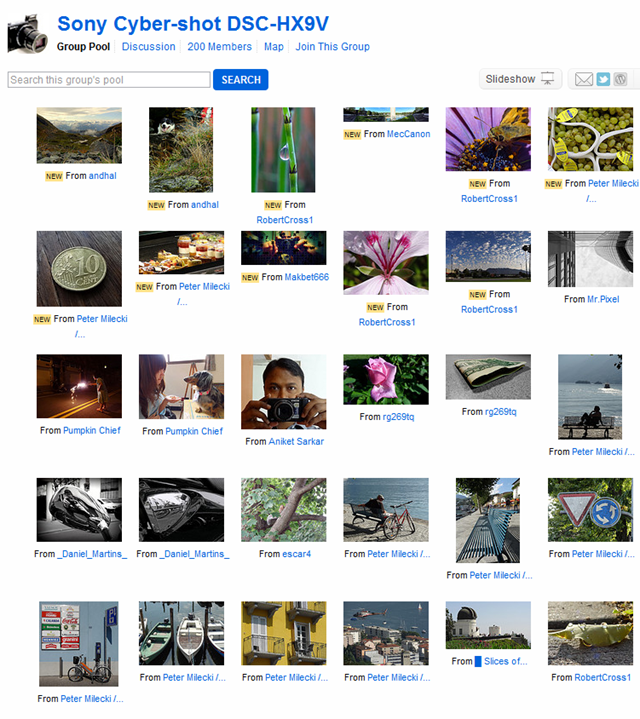
Here is a Flickr group with photos from users that own the Sony HX9V-
as always if you have specific camera questions, email me at goodmorninggloucester@yahoo.com and I can help you make a decision on which camera to buy for your budget and needs.
Spread The GMG Love By Sharing With These Buttons:
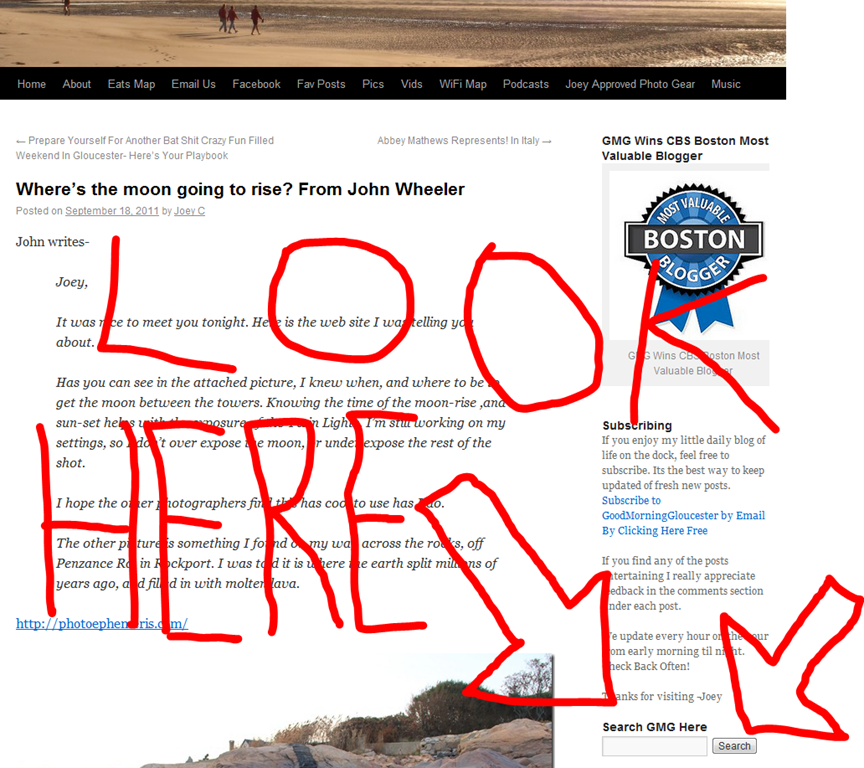
I’m happy whichever way you come back to us, so long as you indeed , come back to us. I’d like to explain for the folks that follow along with us through Facebook and through the nightly email subscription about some features you may want to utilize.
So if there is something that someone tried to tell you about that they saw on GMG say last week and it doesn’t happen to be on the front page any more, just type in the topic in the search box. If we wrote about it, chances are you can find it in the search box.
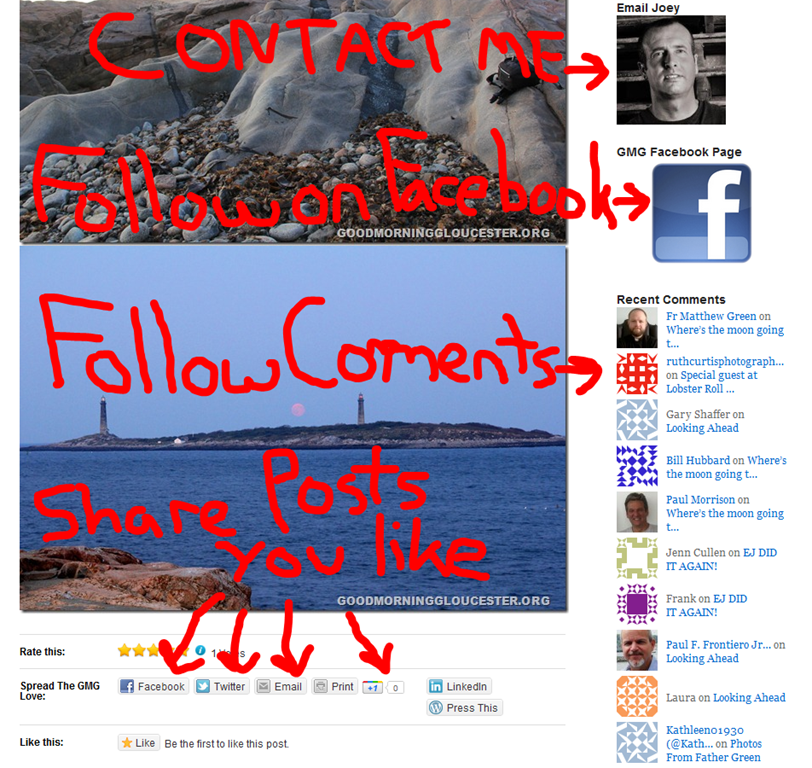
Below the search box in the right hand column when you access the blog directly at www.goodmorninggloucester.com There are options to email me, Follow our posts on facebook, follow along with recent comments and below each posts there are little buttons you can click if you care to share a post you like. the options offered are sharing on facebook, twitter, share by emailing the post, you can print the post, share in google circles, and more.
Below that you can check out the podcast, Learn how to get a free GMG Sticka, and listen to the official GMG Theme Song From earl and Arch
That may be a lot for the technology challenged folks to absorb all in one day so we will revisit more GMG tools available on the blog in installment II tomorrow.
Spread The GMG Love By Sharing With These Buttons:
It was nice to meet you tonight. Here is the web site I was telling you about.
Has you can see in the attached picture, I knew when, and where to be to get the moon between the towers. Knowing the time of the moon-rise ,and sun-set helps with the exposure of the Twin Lights. I’m still working on my settings, so I don’t over expose the moon, or under expose the rest of the shot.
I hope the other photographers find this has cool to use has I do.
The other picture is something I found on my way across the rocks, off Penzance Rd. in Rockport. I was told it is where the earth split millions of years ago, and filled in with molten lava.






























 Good Morning Gloucester