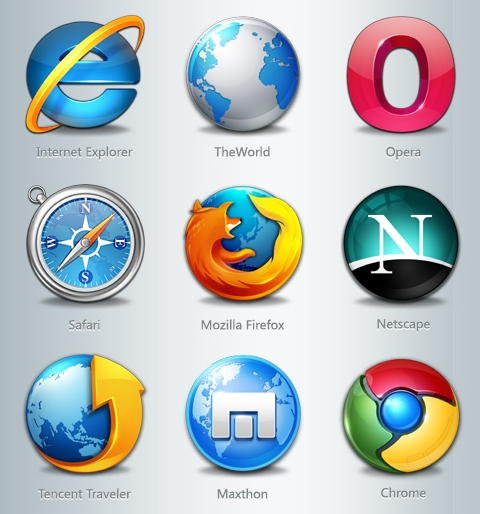
After basically swearing off Internet Explorer about three or four years ago I’ve been a pretty happy Firefox user but my interest in Google’s chrome has been piquing.
When we got stuck in Florida on our trip back from St Lucia last week we were lucky enough to get some time to hang out with my parents in Naples. In addition to affording me time with my parents I got to log onto a computer for the first time in 9 days- my mom’s. My mother will click any picture sent in an email by one of her friends that has a cute dancing bunny or heart on it (without any regard for the spyware or viruses she is downloading to her computer with that click). She also has a fondness for toolbars it seems.
On a 17 inch laptop she may have had 3 inches of visible screen real estate after you account for the 8 or so toolbars that she has running in her Internet Explorer browser. Let’s see, I think there was Yahoo toolbar, AOL toolbar, Google toolbar, something called Smilebox,and two or three coupon alert toolbars that I could remember.
Clearly I needed to download a new browser for her. All this crap she had downloaded brought her laptop to a crawl. I could almost hear it crying out for help, saying “Please, help me tell me you’re not going to add more crap to my already splitting at the seams workload”
So I downloaded Safari for her. I’m not really sure why I picked Safari but it probably had to do with the fact that I was using Safari for the past 8 days on my iPad and it’s a pretty clean interface. So once I got Safari on her laptop and imported a bunch of her favorite bookmarks to her toolbar and gave her a quick lesson on how to add bookmarks she was off and running. The new browser started up about twenty times faster, there was about 80% more screen real estate due to the lack of those layers of toolbars stacked from the top of her screen to three quarters of the way down. It will work well for her.
So I got home and the Mrs’ laptop has Internet Explorer as the default browser as well. The Mrs to her credit is pretty good about detecting what she should and shouldn’t click on. (Anyone have any general rules we could pass on to folks as to what you use for criteria for what you will and won’t click on?) But I’m just not a fan of Internet Explorer. It seems so sluggish and automatically hyperlinks things I don’t want hyperlinked, the security settings slow me way down and it doesn’t offer me single right click access to image url addresses and other geeky stuff that 97% of you probably needn’t worry yourselves about but to a person that really uses these features can drive nuts.
So I decided to check out Chrome on her laptop. It was a quick download and I really like the minimalist and clean layout. I haven’t used it enough to really know if it could replace Firefox on my desktop at work but it really simplifies many steps such as bookmarking and I love how doesn’t use up a lot of your screen with toolbars. It also seems super speedy.
So this leads me to ask my viewership- Which web browser do you use and why? Please leave a comment and let me know where you place your browser love?
Spread The GMG Love By Sharing With These Buttons:
Y’all should start seeing a new Favicon in your web browser when you click on your GMG bookmark or have it on your screen. Upon prompting from NorthShoreKid’s Bill O’Connor I tweaked one of the logos that Beth Swan made for the blog.
I started with this-
Step 2) Filled In The Background Blue
Step 3) Filled More Background and cropped out the white in bottom right corner
Step 4) Blacked out the small type of GOOD MORNING GLOUCESTER and replaced it with hopefully somewhat legible GMG once it is shrunk down.
Let me know what you think.
In case you didn’t know, a favicon is the little tiny logo that appears in most web browsers’ address bar or when you save it to your bookmarks or in your bookmarks/favorites folders it will be the little logo that accompanies the web address.
I made the one above but Bill made a couple of different ones that I’ll post within the next few days and we will let the readers decide which one they prefer in a poll. Which ever Favicon you guys want is the one we will go with.
Spread The GMG Love By Sharing With These Buttons:
You know how there are those little annoyances in your life that after a while get under your skin? One of mine is this social media company Linked In.
Listen, I like Social Media. A blogger generally gets how useful a tool it can be. Even though I don’t use Facebook I recognize how powerful and fantastic a way it is to communicate. It is taking over the world, believe me. The only reason I’m not on Facebook is because of the dedication to GMG. If I ever got started with FB the time suck would take away from this great thing we’ve created and we can’t have that now can we?
I’m a fan of Twitter and how effective a communication tool it is. 140 characters easy-peasy directed to exactly who you would like and delivered to their mobile device, desktop or email. Fantastic.
I just don’t feel the need to be on another Social network and especially one that seems so goddamn desperate that they can’t take no for an answer. For any of you who are choosing this Linked In social media thing I’m guessing you are doing so because it is what they are selling you as the business type of social media much like they try to sell business people on the inferior Blackberry technology over Android or even better iPhones.
Listen to me- when you sign up for this Linked In service and send out messages to everyone in your email contact list, they are just hammering your contacts with invitation reminder after invitation reminder even though you’ve already ignored the last one because you don’t feel like having to tend to yet another social media service. Trust me on this- no one gives a fuck about Linked In- all the cool kids are on Facebook.
I understand why they send these invitation reminders. It is because for you to accept the invitation to join the person on Linked In, you need to join Linked In. They would like to build up a network much like Facebook and possibly sell it for a bazillion dollars but friends believe me, it’s an also ran much like Blackberry will be and Nextel. Just because they TELL you it’s for business people doesn’t make it a better technology.
Please for the love of god don’t send me any more Linked In invitations because much like the past 7,000,000,000 Linked In invitation reminders they will be ignored.
Please don’t take this that I still don’t love you and want to hear from you. I’m just trying to enlighten you on what the hell is going on with this brutally obnoxious social media company.
I’d like to be Linked Out
Spread The GMG Love By Sharing With These Buttons:
With the explosion in eBook readers such as the Kindle, Nook and iPad I‘ve been intrigued on how things in the publishing world are changing. Katy Valentine has a good number of books in print and also available electronically. Not only that, Kat has helped local authors self publish their own books like Melissa Abbott. So to say that Kat can speak to the subject would be an understatement.
So Kat is doing a series on her blog-Parlez-Moi Press about the different ways that people go about bringing their books to the marketplace and she is Guest posting here on GMG.
So here is the first in her series-
How To Publish Your Book (or Not)
Innovations in digital technology mean that publishing today is very different than it was even a few years ago. Also the growth and popularity of ebooks has changed the entire industry. In December 2010 Barnes & Noble announced that their web site sold more ebooks than print books. This trend is just beginning.
Since I have five books currently in paperback and six ebooks (plus 2 in production) I have learned a lot about the publishing industry. In 2010 I sold a little over a thousand books in a combination of paperback and eformat. Along the way I’ve learned a lot about publishing and I am writing this to provide information for other authors who wish to publish. What I write here is purely from my own experience and I will be adding to this as time permits in the hope it will help. So let me begin with a few words about conventional publishing:
Part 1 – Conventional Publishing & How It Works
The ideal for most aspiring authors is to sell their manuscript to a big publisher, get a hefty advance, and have their book edited, designed, printed and distributed. Once the book is in print authors dream of book signing tours set up and paid for by their publisher where they are wined and dined, meet their fans, sell and sign lots of books, and the money starts rolling in. The ultimate ideal is for the book to be optioned by Hollywood, a movie made with top name stars, and merchandising rights for everything from t-shirts to video games. This is a nice dream and it does happen for some lucky people but they are very much in the minority.
The truth is a publisher has to consider a lot of factors before even considering to publish a book, the top ones being a.) how much will they have to invest to produce it, and b.) how much market appeal does it have. Producing a book is very, very costly. The process of editing, working with the author through rewrites, designing, printing, distributing and promoting is expensive and publishers have to make sure their investment will yield a profit to justify their expenses. One of the things they need to consider is how marketable the author is, as well as the book. Like it or not, we live in a personality-driven society. New authors are tough to promote and an author who has a certain measure of “star” power has an advantage. Sad to say, but a lot of readers are more interested in the authors than in their books.
Speaking solely for myself (and anyone that doesn’t feel like looking ridiculous in the comfort of their own home).
Here’s a little missive to the electronics manufacturers who, in the quest to try to bring us new technology that we will feel renders our existing technology obsolete have been investing billions in research and development to bring us 3D cameras, video cameras, monitors and televisions.
Do you really think that people are going to sit around the living room wearing huge black 3D glasses?
I find it sort of sad because one of my favorite camera makers- Sony is one of the leading pushers of this technology. It would have been nicer if that money was spent developing faster internet, sharper displays, lighter laptops, compact cameras with large sensors and longer than 5 times zooms, or any other number improvements to existing technology rather than trying to sell the public on a technology that in my estimation very few people really care about.
Seriously?
Spread The GMG Love By Sharing With These Buttons:
The app is free and I just took a screen capture of the current map they provide. Best free weather app I’ve ever used. This screen shot was taken from my HTC EVO just minutes ago.
Spread The GMG Love By Sharing With These Buttons:
Most of you may already know this but I think it bears repeating because I am sometimes guilty of making the same mistakes repeatedly.
When searching for airfares for my winter vacations I start early, about three months ahead of time and I check the regular websites for the best deals on flights. The main website I use is Kayak which gives you some pretty decent customization options as far as whittling down the exact flight times and non-stop flights so you can only be viewing flights that meet your criteria instead of 1000 or so flights that have 2 or more connections or are red-eyes.
I prefer early morning direct flight departures and mid day direct flight returns. Kayak allows me to do searches for the exact flights that meet my criteria.
The searches can be then filtered by cheapest price or best times or shortest route. The way I usually perform my search for the best flights is this-
I check off
Non-stop
My flights are flexible (Plus/Minus 3 days)
Depart Early
Return Mid-day
Now I’ll check every other day or so until the flights I want come up within the prices that are reasonable to me. For Florida this means direct flights at the right times for anything under $235 and for the Caribbean anything under $400.
Once I see those flights coming up I go directly to the airline’s site for which that fare is listed to se if it is listed for cheaper on the Airline’s website. I figure that most times the airfare aggregator probably adds $10 or so to the costs to pay for their service. some times it will be listed a little cheaper on the Airline’s website, sometimes not but it’s always good to check IMO.
Now here is the thing though that even I who I consider to be a pretty informed and savvy web travel person still to this day forget at times in the excitement to book a great deal.
Firstly there are the baggage fees that should be taken into consideration.
American Airlines charges $25 for your first checked bag on domestic travel.
Jet Blue offers the first checked bag as free.
So when comparing the two 9 times out of ten I will book the cheapest fare the way it is listed on the Kayak site but forget about the baggage fees. A $225 flight to Miami on American actually will cost you more than a $240 flight to Miami on Jet Blue if you check one bag, but it won’t be listed that way on either kayak or on the individual Airline’s respective websites. now $15 isn’t a whole lot but then if you consider that you might be flying with a partner or children and it turns out to be three checked bags that would be $45 each way equals $90. Ideally you can travel light and avoid checked bags all together but in many instances that is just not a reality.
The next point that I would like to make is that not all airlines are created equal and some don’t have TV or Internet on them. I don’t know about you but I would gladly pay an extra $30 for round trip airfare anywhere in the country that offered tv and/or internet in the seatbacks in front of you.
So now lets take the above instance of the flight to Miami on American for $225 which doesn’t have internet and only has a couple of TV’s in the middle of the aisles for which you may or may not have a decent view of and charges you an extra $25 for your checked bag.
$240 for a flight without a checked bag fee on a newer Jet Blue plane which offers wifi internet and individual TV’s in each seat is an absolute bargain.
Take your time when you are booking your flights and figure out what the baggage fees will be along with if the airline has wifi on your flight. A flight to Vegas with internet access will literally FLY BY a whole lot quicker with the internet to distract you, I guarantee it.
Spread The GMG Love By Sharing With These Buttons:
Many of you may know that I’ve entered the world of Apple computing with the purchase of a macbook pro. It’s a 13 inch model with a 4GB of RAM upgrade.
I’m in general a fan of apple products but I’m not blinded like some apple fanboys who claim that everything they do is gold. In my limited time with the macbook I’ve seen some things it will do much better than the way I can do them on my PC but also some things the PC with Windows 7 does better than the mac.
Windows 7 is a really huge upgrade in the operating system over all previous versions from Microsoft. The filing system and ease of use and integration of products using Windows Live make it crazy simple to create content for blogs (something I know a little about).
To be fair I’ve only spent a little time with the macbook but in my research to find desktop blogging software like the Windows Live Writer on a Mac, all of the mac forum users reiterate over and over that there really is no product that is nearly as good for desktop blogging as the Windows Live Writer which comes free with Windows 7. There are versions for the mac such as Marsedit and Ecto but they both charge for the software and they are missing key components of desktop blogging software such as scheduling a post for posting at a certain date in the future. If you create as much content as I do for the blog it is essential for me to be able to schedule posts out into the future. We keep an hourly schedule of new posts at the top of the hour every hour from 6AM-6PM with an occasional overnight post thrown in if there is something timely that we want to get out. So that feature being missing is brutal.
I don’t want to create a post and have it uploaded directly to the blog because often times I create 5 posts in an hour and I don’t want them all going out at once. They need to be spaced out. Of course I could go back in to the blog and edit the times online but the post has already been delivered to the people who subscribe to the GMG rss feed and view it in a reader like Google reader.
That is just one example but it is significant (to me anyway)
Things that I’ve found to be way more polished on the Macbook than on the PC using Windows 7- iMovie for editing movies although you can create movies way faster with Windows Live Movie Maker using the auto-movie function, the options are not going to look as polished as they will with iMovie on the Mac. iPhoto software is much more polished on the Mac than it is using Windows Live Photo, and Pages will make far more stunning brochures than you will with the Windows equivalent.
There is one thing that I’ve discovered about Apple’s mobile me product that is beyond horrible and everyone should know about because you could be in for a world of hurt if you rely on this system of syncing your data between all your Apple devices “in the cloud”. The cloud is the future for sure. Saving your pictures to sites like Flickr, Photobucket or Picasa is a brilliant way to store them as long as you physically back the pictures, videos or documents up onto external hard drives as well.
I would say the same thing for Apple mobile me but there is a huge catch that is probably not explained to people when they buy their iPhones or Macbooks. You pay $99 per year for the privilege of uploading your picture, video or documents to mobile me for sharing anywhere you have access to a computer. (You can get a discount the first year to something like $69) The problem is that they are telling people that they can host their iWeb websites on mobile me and also their content to mobile me but what they don’t tell you is that if you ever decide to stop paying that $99 per year and opt out of mobile me that your content will be deleted after a short grace period!
Holy crap I couldn’t even imagine creating a website using Apple’s iWeb, hosting it on mobile me, and then being locked in to paying that $99 vig every year or else all that content that had been created and all those links from pictures to where they belong on the sites would all be broken. All you would have is a bunch of little red x’s where pictures are supposed to be.
They cap you out on mobile me at 20GB of storage to the cloud per year. For most people that would be fine but I can tell you that for GMG we would smoke that in a couple of months.
So people I would tell you not to pay for this mobile me and be locked in to that $99 per year under penalty of losing all your stuff.
A difference between mobile me and the Windows Live Sky Drive is that Windows Live Sky Drive gives you 25 GB of storage to the cloud (it’s virtually the same setup as mobile me) but they give it to you for free.
Spread The GMG Love By Sharing With These Buttons:
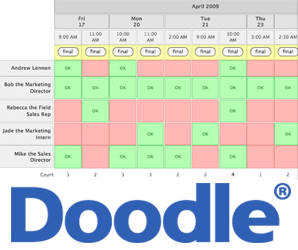
Doodle is a free online program which allows a group of people to check off a bunch of dates that they are available for a get-together or meeting. It aggregates all the dates and gives the best dates for which the most people can attend. So simple and so useful instead of doing the ten person email chain back and forth thirty times to figure it all out.
Easy Peasy
Spread The GMG Love By Sharing With These Buttons:
For a blog to be somewhat successful one component of it’s success will be it’s owner’s ability to apply technology to tweak the settings, to figure out what new technology is being used to create, lay out, and distribute content.
The technology side is not the most important aspect to having a well read blog. The most important factor being that a blogger provides the reader with interesting content. There are probably blogs out there that do well despite the owner’s lack of knowledge of how to leverage existing technology (much of which is free to use). These bloggers may write for publications that have tech staff who handle the way their content gets distributed so all they need to do is write and email in their piece. GMG and all it’s techy features were all figured out one at a time though. we didn’t have a computer engineer to walk us through the steps, but hopefully i can help you by directing you all straight to the best of the web that I’ve found through extensive research over the years.
When I started GMG I had no idea how to code things to look a certain way. I had no idea about distribution, video editing, video or photo hosting, what widgets were or how they relate to a blog, what a blogroll was, ect, ect, ect. Never took a class, but I just got started. Didn’t let much intimidate me and when I had a problem that I couldn’t figure out I used the wordpress or google search box and typed in the question. It might have taken a while to figure out the right way to enter the search query properly but eventually I would get the answer. This is especially true if I thought there was a way to make the blog better or how to increase the readership. I’d just keep researching til I found the right answers.
So during my quest to make the blog the best it could be and to reach the most people it could I figured out that there is an incredible number of free resources out there to help you. There are free video hosting sites. There are free photo hosting sites. There is twitter. There is Feedburner. There are statistics sites. The number of resources that you can use to help in your blogging journey is mind boggling but you need to know where to look to find them. You also need to know what the right tools you should consider for your content creation whether it be software or cameras, tripods, video editing software, photo editing software, computers, smartphones and any other stuff that you use in the creative process.
So here is a list of geeky tech sites I visit and have in my rss feeder to keep track of the latest and greatest technology.
lifeHacker tackles a ton of do it yourself tech ideas, and is a site I believe anyone could enjoy, even someone that doesn’t care about computers. It has great travel tips. It has a weekly Dealhacker post in which they scour the interwebs to find insanely good tech deals and list them for you.
Gizmodo Is a gadget guide. If you are a techy gadget freak like me you can’t get enough of sites like Gizmodo and fierce competitor Engadget listed below.
DPReview is THE source for camera reviews and news. You can find out the latest cameras and you can also do camera comparisons by selecting certain specs that might be important to you. There are also photo examples taken by each camera and user reviews.
Newegg offers daily deals and is the place I feel MOST comfortable buying my external hard drives, flash drives, computer monitors, cameras- basically anything. The prices are great and the shipping is insanely fast. I’ve gotten things overnight without paying for overnight shipping. They also have a great return policy. I Highly Highly recommend Newegg for technology purchases. I subscribe to their daily deals newsletter in which they always have prices that make me scratch my head. More times than not you’ll find it cheaper on Newegg than you will at best Buy.
Bidding For Travel is a forum where users list their winning Priceline Hotel Bids and Rental Car Bids. I can confidently say that we’ve probably saved $5-10,000 on travel over the past decade using the information gleaned from this forum to drill down and offer ridiculously low prices for 4 and 5 star hotel rooms and gotten great rates on rental cars. Read the FAQ to get a better understanding of how it works and you too can routinely get 4 or 5* hotel rooms in Boston, Las Vegas and other big cities for over half of what the prices they list on their own websites by using the winning bids of others to get a great deal on a room using priceline.
Better Bidding does same thing that Bidding For Travel Does. the only reason I listed Bidding For Travel first was because I discovered that site first a long time ago. Both sites are worth visiting before you plan a stay someplace. You are wasting money if you don’t use these free tools to drill down on incredible travel savings.
Aviary is a suite of online cloud based computing tools like photo editors, video editors, color editor, image markups and the like. You don’t have to install anything to use Aviary. It’s all up there in the sky, and Free. Did I mention it’s free?
Flickr is a website where you can upload and categorize your photos. The reason it is a great idea to upload your photos to a web hosting site like Flickr is because Computers crash and you can lose all your shit but if you take the time to upload your photos to a site like Flickr and put identifying tags you can always have access to your photos no matter where you are. At Flickr you can also use their photo editing software to edit your photos online. Some people are partial to Picassa which is another great place to store and edit your photos.
YouTube is THE place to host your videos for a variety of reasons. I used to pay for hosting on Blip.tv because they would convert the video and put them in podcast form for iTunes, but discovered that the way YouTube will automatically make a bunch of different quality movies for you so that people with slower computer connections can view the lower resolution videos you create without having to stop and let them load to view them. They aslo have the best distribution and sharing options. You can upload your video to YouTube for free and share them in emails or on websites with ease.
Those are the biggies for me.
You could waste days looking through all of those but I would suggest you bookmark each one because they are all the best I’ve found over the years.
Hope I’ve provided some decent info for you guys.
-Joey
Spread The GMG Love By Sharing With These Buttons:
Joey, your tech posts are great. I wouldn’t be at all surprised if ZD was watching you!
Question: What do you use to edit your video? I’m looking for something relatively simple with basic functionality (and free if possible). Any suggestions?
That’s a great question Abbie. The editing program that I finally found was a godsend.
I’ll share the story of how I arrived at the video solution that worked for me. Keep in mind however that I am not trying to say that the editing solution I use is perfect for everyone. I will say that it is super fast, super easy, can edit today’s HD technology (which is what most new cameras ship with nowadays) and gives you a variety of preset formats for you to save your project in. You can save it as a dvd, you can save your video as a standard definition smaller file size, you can save it in HD, and there’s even a upload direct to YouTube preset which I use 90% of the time.
I’ll start in the beginning of my quest for the right video editing software. In the early stages of the blog I was using the Sony H3 camera which shot standard definition video. It was a bit grainy in low light, it was more square 4×3 in dimension and didn’t have the polished look of widescreen HD video. The newer cameras that were coming out shot in HD, 16:9 widescreen and I wanted the blog to be the best it could be. The desire to shoot interviews and the Gloucester Zen scenes in HD was consuming me so I read every single forum and magazine article I could about HD cameras.
I realized that the new Sony model that had replaced my H3 shot in HD and was pocketable (an absolute must for my blogging needs) The camera needs to be on my person to capture things as they happen and not disrupt work running to the office to set up a dslr or separate video camera.
So I bought the new Sony, the DSC H20, my current camera, which shoots 720p HD and went to edit my shoot first movie and my Vista PC could not push the movie around to edit it. It was a format called AVCHD and most video cameras today shoot in this format. I was horrified. My baby, the H3 that had been with me from the start of the blog and recorded hundreds of great scenes had been sold to a good FOB Brenda Malloy and here I had a new camera that made better qualoity movies but didn’t have the tools to edit them. To say I was frustrated would be a major understatement.
So back to the forums for answers. Vimeo, a video hosting site has a fantastic user community forum with some professional video editors and camera folks that can answer just about anything. A good majority of the people suggested Apple Final Cut Pro or iMovie but I had a PC and switching to a mac was not something I was even considering.
Most of the people on the Vimeo forums that owned PC’s suggested Sony Vegas video editing software. It was $80. I bought it because I desperately wanted to edit HD video and I desperately wanted to create more content for the blog.
Sony Vegas is a bit complicated. It was a good program for someone that needs a ton of different options as far as different transitions and color schemes and trickery and special effects. I consider myself more advanced than the average computer user but I had a very hard time figuring out the right export options and if you didn’t do things just right you would have ugly black bars on the top or sides of the video. It also used a ton of system resources on the Vista machine and many times the video would render without sound. I was ready to tear my hair out (and if you know me you know that the little hair I have left is a rare commodity).
So then someone did something very mean to me. Another Blogger and tech geek like myself Kenny McCarthy from The Cut Bridge Blog let me borrow his macbook for a couple days. It was just a basic one, a couple years old but I fell in love with it. I became obsessed with getting a mac- any mac because you can make a pretty professional looking movie with the editing software that comes with them.
Research began. Going into the Apple store every time I was at the mall, logging onto the Apple online store and configuring just the right model but the prices were going to be over $1000.
Cut to the house. My wife’s laptop shit the bed and it needed replacing. I did some research and because her computing needs consist of A) browsing the internet and B) logging onto the internet to check out her Facebook account I decided that for her needs a 4GB of RAM 500gb of storage computer with the newly released Windows 7 would fit the bill. We spent $550 for a Toshiba Satellite 17 inch laptop with a 12 cell battery that screams.
Not knowing a whole lot about Windows 7 beforehand I set out to set up the new laptop for her and discovered this new suite of programs that Windows 7 ships with.
Microsoft even had a blog explaining each new program. While I used Windows Movie Maker with my first camera on the Vista machine the new Windows 7 shipped with a completely redesigned movie editing program that had a very similar name- Windows Live Movie Maker. I checked out these easy to follow videos on the Windows Live Movie Maker Blog which showed how ridiculously simple it was to make movies with transitions and titles and end credits in mere minutes. The video demo was easy to understand and genius in is simplicity.
Now for MY NEEDS, with such little time to bang out videos and the amount of content I create I didn’t need the complexity of Sony Vegas’ video editing software. I also saved a considerable amount of time with Windows Live Movie Maker’s Auto Movie function over the Apple iMovie.
I can edit a 9 minute HD movie with 20 different slideshow pictures and 3 different movie clips with titles, end credits and transitions in literally less than 90 seconds with Windows Live Movie Maker. I challenge any other movie editing software to be able to do the same in that little time.
Here is a video demo of just how easy Windows Live Movie Maker Works-
So instead of buying an Apple for $1300, I got myself a new gateway desktop with 6GB RAM, 1 Terabyte of Hard Drive Space and Windows 7 operating system for $579.
It does everything I want it to do really well and for blogging I’m convinced I can edit my blog in at least half the time with Windows Live Writer (another free program that ships with windows 7) than I could on any other machine. I also love the snipping tool where I can copy anything on the screen of any web page even if it is a flash movie slideshow or a YouTube Video and paste it into Windows Live Writer and BANG, it’s there! That’s how Abbie’s avatar got into this post up at the top of the page,the snipping tool I captured it from her comment and pasted it in the edit box on Live Writer. No dealing with any url address of where the picture of her avatar was located or code- just a simple capture and paste.
This is coming from a guy who had major Mac lust not even a year ago. I’m just lucky my wife’s old laptop died and needed replacing or I might never have found out how great Microsoft’s new suite of software is. I’ll say it again, I’m shocked that Microsoft isn’t beating it’s own drum more loudly with the clear winner they have in Windows 7.
Spread The GMG Love By Sharing With These Buttons:
A couple of upgrades to the storage and ability to edit video would make me a buyer.
It was interesting that they found that watching video not ideal on the iPad. In my admittedly short experience handling one I found watching video t be one of it’s strengths.
Spread The GMG Love By Sharing With These Buttons:
Much like yesterday’s tech talk post about the iPad I’m going to share my opinions on some of the popular new technology that has been gaining the hearts of consumers and what I like and think is downright stupid about them.
Today I would like to explain my feelings about pocked HD video cameras that have been become relatively popular in the past two or three years. There are brands like the Flip,Kodak Zi, and Sony Bloggie. You may have heard about them or seen someone use them. They are small, pocketable and pretty convenient for capturing video on the go.
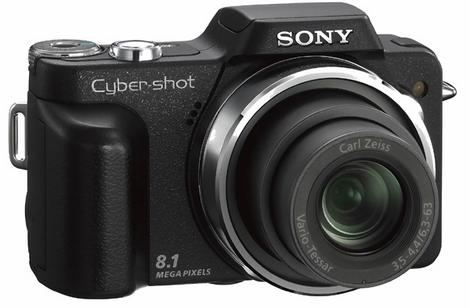
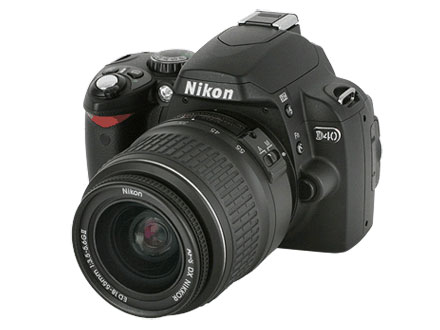
If anyone remembers my adventure into buying a DSLR for use taking pictures for GMG, here is a post from July 2009 when I had decided to sell the original camera used for taking pictures and video for the blog to upgrade to a DSLR. I sold my original Sony DSC H3 and bought a Nikon D40 and within a day of making the purchase I regretted it terribly. The reason I regretted it terribly was because when capturing the amount of content for the blog that I do I found that I absolutely needed to have the camera on my person. A big bulky DSLR that was up in the office when a rare lobster came in or in the truck when I wanted to capture something in a shop downtown was absolutely useless to me. The adage I heard (and unfortunately don’t remember who to attribute it to) of “The best camera is the one you have with you” is without question the principal which dictates my camera buying ever since my foray into the realm of the chunky DSLR.
The original GMG camera the Sony DSC H3
The Nikon D40 DSLR which I owned for two days before returning-
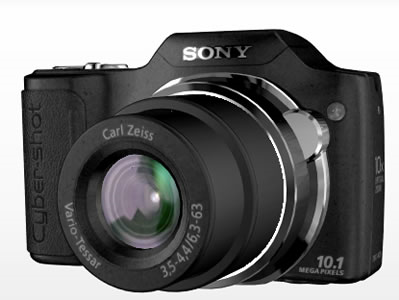
I realized that the smaller pocketable Sony was doing a great job for the blog and immediately missed it. It took video but not HD video which was something that was becoming more and more popular at the time. After researching a bit more I found just the camera- it was the camera I use currently- a Sony DSC H20. The H20 was simply the next generation of the original camera I owned, the Sony DSC H3. It had a nice zoom for capturing stuff that was happening across the harbor like the H3 had but it added HD video recording which is my passion. The interviews for me are the most fun so being able to capture interviews in HD in a pocketable camera in HD and also take great pictures in that same camera is the perfect combination. No extra video camera, all in one solution, on my person, all the time.
The Sony DSC H20 (the current GMG Camera for your boy Joey)-
So this is where I get to the part where I explain why I think the small Flip cameras are a stupid idea.
Much like the iPad gives you way less functionality than a small laptop computer for a whole lot more money, the pocket video cameras give you way less functionality than a small form camera that also takes great photos. The small flip cameras have smaller lenses and thereby take much less quality video and video than a camera with image stabilization and a larger lens not to mention the fact that the pocket camera like the Sony DSC H20 take great pictures IN ADDITION TO video for a tiny fraction more money. so people don’t be fooled by gimmicks. if you want a small video camera look no further than the current point and shoots that incorporate HD video along with decent photo taking.
The iPad sure is sexy. I’ll spare everyone from making any inappropriate jokes about tampons in this space and focus on the tablet gadget that Apple came out with back in April of this year.
Some folks take the Microsoft vs Apple thing way too far much like some folks take the republican/democrat things way too far and let the principles that each faction stand for blind them to any good there may be in the opposing camp.
Before Windows 7 came out I had crazy lust for a macbook because I couldn’t edit HD movies on my windows based computer like I could on a mac. Walking past the Apple store at the mall without popping in was and is not very likely for me.
When the Mrs’ laptop shit the bed this winter I priced out mac laptops for her as a replacement and as much mac lust I was having at the time, a $1000 laptop was/is overkill for her very simple web browsing and Facebooking needs. So I went out and bought her a Windows 7, 17 inch laptop with 500 GB of storage space and 4GB of RAM for $550.
It wasn’t long after messing around with her windows 7 laptop that my mac lust had up and left the building. It baffles me that Microsoft is not crowing more about the success of it’s new operating system. They made the file system so incredibly easy to use, they added a slew of useful tools that to steal the Apple phrase “just work”. I can easily bang out content for the blog twice as quickly on a Windows 7 machine than I can on an old Vista machine. Every single Microsoft operating system up until Windows 7 truly sucked ass but Microsoft really hit a home run with Windows 7.
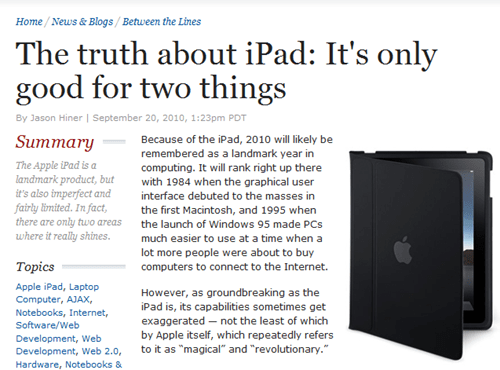
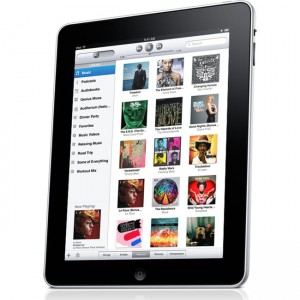
The iPad still intrigued me as a pretty neat tool but once I dug into the specs and what it can and can’t do I similarly can’t justify the expense. Sure it is visually stunning, sure it is light weight and portable but consider the price for the base model-
$499 for a wifi version with only 16GB of capacity. $599 for a wifi version with 32GB of capacity and $699 for 64GB of capacity. The screen’s display is 9.7-inch (diagonal) and is really a thing of beauty to look at but if you were going to carry the thing around in a bag you would need to get some sort of case for it to prevent it from getting scratched up.
All this begs me to ask the question- Why would someone spend $499 to get a machine that can only do a fraction of what you could do with a windows based laptop that demolishes the iPad on just about every single statistic?
Here’s where I answer my own question-
The reason people are buying these things is because for 90% of the users out there they don’t need all the specs that a power user or someone that actually creates content needs. My guess is that 90% of home based computing is for browsing the internet and consuming content and for those people the iPad is pretty damn good. The interface IMO trumps anything that is out there for a internet content consumer.
My needs as a heavy content creator cannot be met by a $499 16GB of storage iPad that does not (as of this writing) allow you to edit video. It also does not have a usb port which means you can’t even use a portable external drive. That is a huge failure for MY needs but for most of the computing public it’s of no concern at all. Apple to their credit is smart. They aren’t trying to capture every single person in the universe. they don’t care about the power user in this space or else they would at the very least up the RAM and provide a USB post. They are producing quality products for the masses that are slick and extremely easy to operate and for the vast majority of users, my guess is that they never take a bit of video off their video cameras and edit into a movie on their computer.
Poll time-
You can’t argue with the recent study by Morgan Stanley Research which showed how much US Retail Notebook sales have decreased since the announcement of the iPad. Those numbers are staggering. I guess that will be good news for those of us power users who will probably be able to get incredibly powerful machines for very little scratch due to an abundance of supply while all the consumers of digital content add the sexy iPad to their Christmas wish lists.
So to sum it up-
If your computer usage only consists of browsing the internet and you never edit pictures or save pictures to your computer but want a slick viewing experience (and money to burn) the iPad is pretty sweet.
If you plan to do any serious content producing and/or can only own one device buy yourself a laptop. They are pretty damn cheap and you can do a whole lot more.
Now if in future generations of the iPad they choose to up the RAM, give us a usb port, and a movie editing app similar to iMovie I might reconsider my stance.
You never know, it could happen.
Spread The GMG Love By Sharing With These Buttons:








































 Good Morning Gloucester